• Hi all and welcome to TheWoodHaven2 brought into the 21st Century, kicking and screaming! We all have Alasdair to thank for the vast bulk of the heavy lifting to get us here, no more so than me because he's taken away a huge burden of responsibility from my shoulders and brought us to this new shiny home, with all your previous content (hopefully) still intact! Please peruse and feed back. There is still plenty to do, like changing the colour scheme, adding the banner graphic, tweaking the odd setting here and there so I have added a new thread in the 'Technical Issues, Bugs and Feature Requests' forum for you to add any issues you find, any missing settings or just anything you'd like to see added/removed from the feature set that Xenforo offers. We will get to everything over the coming weeks so please be patient, but add anything at all to the thread I mention above and we promise to get to them over the next few days/weeks/months. In the meantime, please enjoy!

I don't want this NVR switch

That may well have worked in your case Bob but motors with these thermal sensors have several ways of connecting the sensor. Some are common to one end of the run winding so that motor connection needs to be permanently connected through to the NVR.
In this case as there seem to be two sensor wires, then the sensor could well be isolated from the windings who knows.
My concern is that the OP might not know either or be aware of the significance hence my advice to keep everything wired as is and then introduce the NVR.

Options are made all the more difficult as I think the NVR in use is not a full DOL motor switch system but one of the rather technically unpleasant KEDU switches with an electro mechanical NVR where the stop button forces apart the magnetic poles rather than operation on the coil electrically.

Bob
 
My simple world answer (suits you sir) :oops: , is to merely interrupt the live immediately at the NVR exit, therefore not impinging on any other wire or switch.
Worked for me, 4 years now without a problem, used many times a day, but I'm not guaranteeing it will work for everybody. :eusa-whistle:
 
sunnybob":2uv63cb3 said:
My simple world answer (suits you sir) :oops: , is to merely interrupt the live immediately at the NVR exit, therefore not impinging on any other wire or switch.

Worked for me, 4 years now without a problem, used many times a day, but I'm not guaranteeing it will work for everybody. :eusa-whistle:

Yes Great for you Bob in your application but in some instances interrupting the "wrong" wire will/can cause the NVR to drop out.
Giving advice here has to bearing mind different implementations as well as not all reader have the knowledge to dig themselves out of the hole they have just dug.

Bob
 
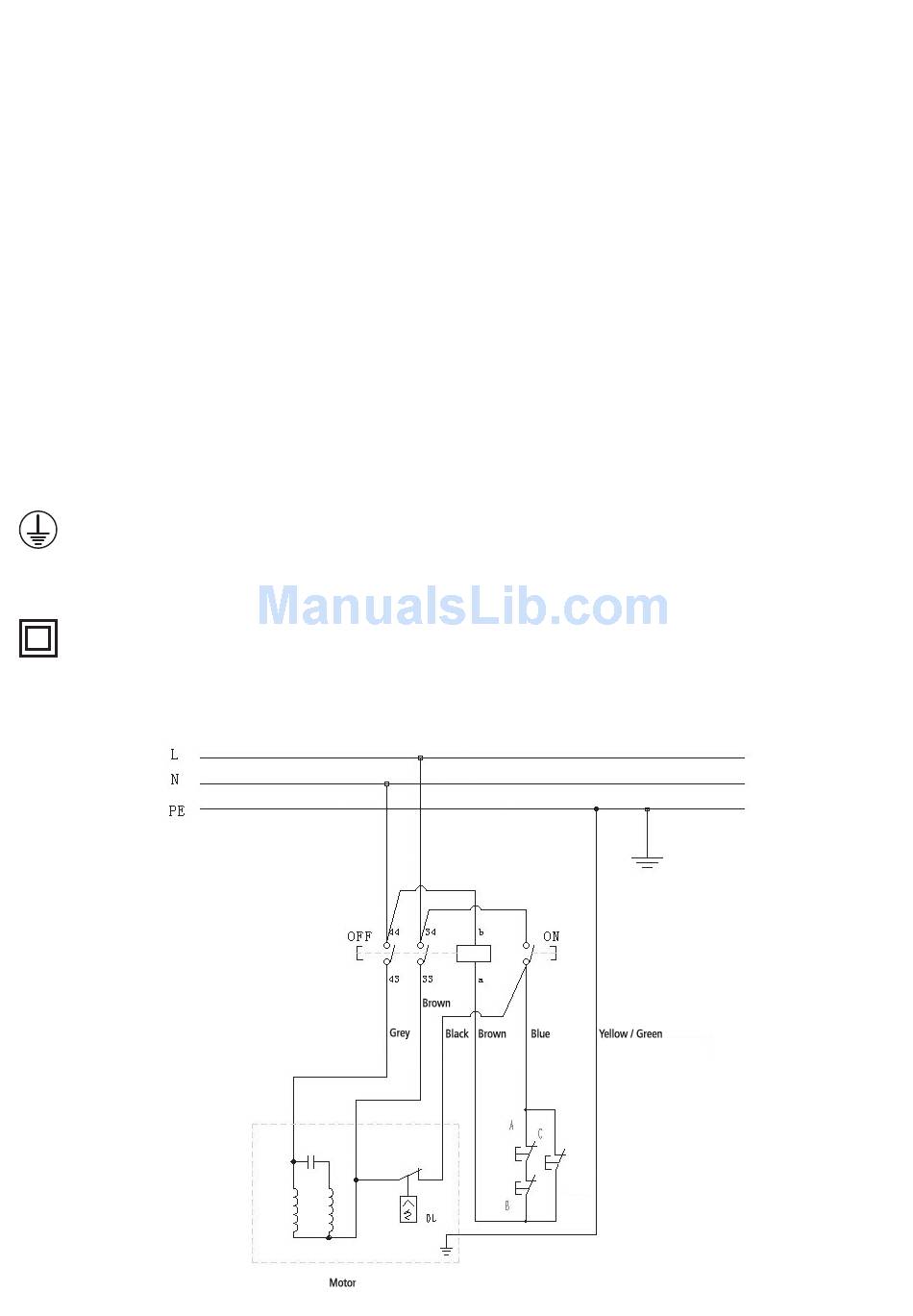
For example, the Record PT260 wiring diagram:

pt260_26_bg.jpg


The live wire from the output of the NVR to the motor also connects to the overload switch in the motor housing, then back to the cut-out microswitches that check the tables and guards are in the right places. Interrupt the supply to the motor, and it'll have the same effect as triggering the thermal cutout, turning off the NVR.
 
Bob, this worked perfectly. Grateful for your explanation!


9fingers":gtwtu8lg said:
Yes it should be do-able.
Use the white temp sense wires in the normal way with your nvr* and insert your relay in the main motor leads between the nvr ouput and the motor power input.

*follow the existing wiring scheme as regards the white wiring as different motors do it slightly differently.

You might have to only switch one of the power wires with your relay to stop the nvr dropping out when your open the relay.

Bob
 
Back
Top