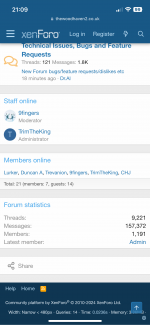
• Hi all and welcome to TheWoodHaven2 brought into the 21st Century, kicking and screaming! We all have Alasdair to thank for the vast bulk of the heavy lifting to get us here, no more so than me because he's taken away a huge burden of responsibility from my shoulders and brought us to this new shiny home, with all your previous content (hopefully) still intact! Please peruse and feed back. There is still plenty to do, like changing the colour scheme, adding the banner graphic, tweaking the odd setting here and there so I have added a new thread in the 'Technical Issues, Bugs and Feature Requests' forum for you to add any issues you find, any missing settings or just anything you'd like to see added/removed from the feature set that Xenforo offers. We will get to everything over the coming weeks so please be patient, but add anything at all to the thread I mention above and we promise to get to them over the next few days/weeks/months. In the meantime, please enjoy!

New Forum bugs/feature requests/dislikes etc

TrimTheKing

Administrator
Staff member
Joined
Jun 16, 2014
Messages
8,393
Reaction score
605
Location
Grappenhall, Cheshire
Hi All

Thanks for bearing with us while the migration to the new forum hosting and software took place. Again we thank Alasdair for doing all the heavy lifting to get us to here, he's been at it since 8am this morning and it really is much appreciated.

For obvious reasons of Administration etc Alasdair will be joining myself and the other Mod's on the Moderation team, what a way to pay the guy back for all his help!!! :ROFLMAO:

As mentioned on the notification you hopefully saw at the top of the page when you logged in, please use this thread to highlight any bug, niggles, issues, feature requests, mistakes etc that you might find as you get used to the forum. Please try not to clog it up with chat, just give us the issue/request etc and a brief explanation of what outcome you'd like to see.

I won't promise you'll get everything you ask for, but I promise that all your letters, dear reader, will be read and responded to in time.

I'll kick us off with the things we know about (just add the next number into your post to continue the list)...

  1. Colour scheme (this will be played with over the coming days/week so don't be alarmed if you log in and things have changed).
  2. Likes/dislikes - Again this will be looked at and in all likelihood dislikes will be removed if they haven't already, because none of us need that kind of negativity in our lives do we! :love:
  3. Banner graphics - Will be added ASAP but weren't critical to us getting fired up and getting you guys back through the doors!
  4. Photo sizing - Don't despair if photo's are buggy, we'll play with the optimal file size and resolution until we find what works best for most people.
  5. Over to you guys...
Thanks
Mark & The Team
 
2 - there are no dislikes - have already filtered to be only positives or neutrals - but we can change the set of smilies used :) nothing will be negative though!

As per Mark's comments - do go and explore, the initial testing I have done suggests that all has come over as it should (panic this afternoon when 6+gb of photos uploaded in an unreadable format - but all now fixed :) ) but would love to know any tweaks / thoughts / fixes needed - I am away this weekend so don't expect immediate responses, but hopefully it should work well enough for now...

I have added location and real name into the boxes on the left - so if you want those to show up - go to your profile (click on your name top right) and add those in and they will appear...

Alasdair
 
If you have received an email from the forum via my work email account - that is a temporary use - the emails will move over to the correct domain as the DNS resolves...
 
Brilliant effort folks. Well done. That was a long day (twelve hours plus)!
 
......For obvious reasons of Administration etc Alasdair will be joining myself and the other Mod's on the Moderation team, what a way to pay the guy back for all his help!!!
Congratulations, Alasdair. Today the forum, tomorrow the world.....:)
 
My little thing for the list is what I mentioned in testing: a "Return to the Top" button. Apparently this is an add-on and not part of the basic forum set-up, but I look forward to it when you can get around to it.
 
Sticky /pinned threads seem to have lost their stickiness. Eg Mikes build thread is slowly dropping down the projects page. Also Bob's motors post at the top of the motors/electricery forum.
 
Great work and a big thank you.
Are we going back to old oak and such like rather than "well known member"?
 
Well I’ve just found my way here. End of a long day here for other reasons so I’ll not have a chance to poke around until the morning.

Thanks Alasdair must have been a bit of a slog and Mark or course you must have taken quite a few hours out of your day jobs to do this, much appreciated.

Don’t break anything until I get back.
 
My little thing for the list is what I mentioned in testing: a "Return to the Top" button. Apparently this is an add-on and not part of the basic forum set-up, but I look forward to it when you can get around to it.
Apparently pressing the home button on your keyboard (if you have one) does have this function... will still look at other options, but the only plugin seems to be a commercial one, so may have to code one myself...
 
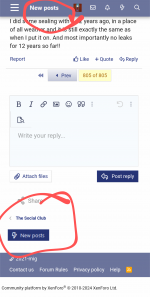
Return to the top would be nice for the phone interface. Failing that (or in addition to that?) a link to the "New Posts" page at the bottom would be really nice.

e.g. like this (from the mig welding forum)

Screenshot_20240405-205004_Vivaldi.png
 
I have a return to top button on my iphone and ipad…
IMG_9051.png
 
Apparently pressing the home button on your keyboard (if you have one) does have this function... will still look at other options, but the only plugin seems to be a commercial one, so may have to code one myself...
That doesn't work, but in pressing the "up" key there is now a little blue square with a white arrow in the bottom RH corner of my screen which sends me back to the top of the page. It's not a good long term answer because you have to press the up button and then navigate to the icon every time you change page, or do anything else on the page you're on.

-

What's happened to the size of everything? The fonts are big. The text boxes are big. The avatar thingies are big. It's a bit weird.
 
I'm logged in, obviously (and with the "remember for next time" thingy ticked), and yet I have just been asked to log in again before viewing a thread (Planing without Winding Sticks).
 
That doesn't work, but in pressing the "up" key there is now a little blue square with a white arrow in the bottom RH corner of my screen which sends me back to the top of the page. It's not a good long term answer because you have to press the up button and then navigate to the icon every time you change page, or do anything else on the page you're on.

-

What's happened to the size of everything? The fonts are big. The text boxes are big. The avatar thingies are big. It's a bit weird.
Mike, must be that way out in the sticks place where you live? :giggle:

Looks OK from down South.
 
Sticky /pinned threads seem to have lost their stickiness. Eg Mikes build thread is slowly dropping down the projects page. Also Bob's motors post at the top of the motors/electricery forum.
It looks as though sticky threads don’t retain their stickiness in the import - but very easy and quick for mods to make sticky again… I have updated Mike’s build thread to test… so expect relevant threads to pop back over time…
 
Well done chaps, having been involved with data centre migrations in a former life, I know how stressful it can be.
Hopefully you guys have the right amount of coffee to lubricate the process.:coffee::p
 
Congratulations on the conversion!

As a nitpick, there is no "Contact Us" link anywhere that I can find. If a member has a problem with logging in (as I did), there is no way to alert an Admin. Unless a member has an alternate way to get a message to the Admins, there is no way to request assistance. The "Use contact form" is in the "General permissions" of each user group. I thought it was set to "Yes" by default, but I could be wrong.
 
To move to top and bottom of page if you are using a Mac, hold down the command key (the one next to the space bar on the left) and press the up key (usually set of four little arrows) or down as needed. On a full size keyboard there will also be a page up dedicated key. For those with a keyboard with floating characters at the top (the touch tool bar) you can assign a key to do this job too if you want.

Also if your browser has a side bar for navigating up and down with a mouse or touchpad you can also click anywhere on that and it will go instantly to that spot (top, bottom or anywhere else).
 
Last edited:
Congratulations on the conversion!

As a nitpick, there is no "Contact Us" link anywhere that I can find. If a member has a problem with logging in (as I did), there is no way to alert an Admin. Unless a member has an alternate way to get a message to the Admins, there is no way to request assistance. The "Use contact form" is in the "General permissions" of each user group. I thought it was set to "Yes" by default, but I could be wrong.
contact form should be back and running…
 
There are 30ish alerts within each members profile and these are all set as notifications on by default. You might find this drives people crazy - I believe you can toggle the default off as admin.
 
There are 30ish alerts within each members profile and these are all set as notifications on by default. You might find this drives people crazy - I believe you can toggle the default off as admin.
There are quite a few because they cover all activity on the media albums / resources, they will only trigger notifications if the user carries out activity there… and each user can turn them on or off as they wish… no strong view over whether they should all start off by default or on by default… only thing is that iff people have started altering them we might upset them if we turn them all off en masse!
 
The 'HOME' Key should take you to the top of the page in Windows 10
 
Well it all seems rather wonderful. Thank you all so much for your hard work!
First look at a thread with photos and they seem to be so much clearer/brighter?
Ian
We took the opportunity to dust them down and polish them!

No real reason other than a white / grey background will make photos look crisper than a brown colour palette - possible that there is a slightly better algorithm if photos have to be reduced on the fly but not sure that makes much difference - still the same photos… glad it looks good though!
 
What is the significance of some sub-forum titles not being in bold ?

Is there a spelling chekker ?
 
Get a screenshot or photo when it happens Mike. I'm not seeing this behaviour.


I did, Mark, because it's happened again first thing this morning, but the screenshot resizes the image, you you've got no sense of scale. I even compared it with Cycle Chat forum, another Xenforo forum, but despite the font being substantially bigger here it looked smaller on the comparative screenshots.

This didn't happen with the test version we were looking at a few days ago.
 
I know it’s not what you want to hear Mike but if you’re the only one seeing it then it points tyo your machine.

Do me a favour and clear out all cookies and links in your cache pertaining to TWH2 and flarebox.com.

I wonder if there’s a cookie related hangover from moving off the test domain (flarebox) to the TWH2 domain…

I’m clutching a bit, but it’s worth a try.

Don’t clear the whole cache, there should be an option to inspect cookies etc and search for anything related to flarebox.com and TheWoodHaven2.Co.uk. Delete those then restart your browser and try again.

If you don’t know you password then message me on the phone assuming you still have my mobile number, and I can get you a password reset sent.
 
IIRC on the old forum, we only got one notification per new post in a thread. No more notifications until the thread was read. XF sends a notification for every single new post, it seems.
 
I've fixed it. For some reason zoom was set to 130% for this site, whereas it is 100% for all other sites I've just checked. Maybe I zoomed in in the past on the old software.
 
IIRC on the old forum, we only got one notification per new post in a thread. No more notifications until the thread was read. XF sends a notification for every single new post, it seems.
Yes I think that is the xenforo approach… you do have full control over the notifications you receive in your account preferences but I don’t think you can set it up to quite that pattern… there is an option to receive a digest but I think that is set to 14 days of not having visited the forum to encourage people back…
 
Back
Top