• Hi all and welcome to TheWoodHaven2 brought into the 21st Century, kicking and screaming! We all have Alasdair to thank for the vast bulk of the heavy lifting to get us here, no more so than me because he's taken away a huge burden of responsibility from my shoulders and brought us to this new shiny home, with all your previous content (hopefully) still intact! Please peruse and feed back. There is still plenty to do, like changing the colour scheme, adding the banner graphic, tweaking the odd setting here and there so I have added a new thread in the 'Technical Issues, Bugs and Feature Requests' forum for you to add any issues you find, any missing settings or just anything you'd like to see added/removed from the feature set that Xenforo offers. We will get to everything over the coming weeks so please be patient, but add anything at all to the thread I mention above and we promise to get to them over the next few days/weeks/months. In the meantime, please enjoy!

Apple Mavericks 10.9 wanted

RogerS

Moderator
Staff member
Joined
Jul 21, 2014
Messages
15,513
Reaction score
1,237
Location
Somerset
I kniw there are some Apple folk here. Does anyone by any chance have a copy of the Instal Mavericks DMG please ? My copy is corrupted and as I want to dnate our old iMac to a good cause, I wanted to (a) remove all my wife's stuff and (b) give them a clean start.

TIA
 
Windows":1oo4u1nm said:
I don’t have mavericks dmg, but maybe you can boot into recovery mode and clean install from there?

Tried that but the Recovery partition seems to have gone AWOL.
 
I can’t really help (not sufficiently computer literate to give advice), but I recently decided to wipe an old Mac and do a clean install of the old OS (Lion I think). I followed Apple instructions expecting to do an internet recovery, but it didn’t work.

In the end, after a lot of faffing about, I managed to find some instructions which told me how to create a USB boot disk on my other (much newer) mac. It worked. I’m not sure I’d be able to identify the exact guide I followed, but I found it through googling. One issue I discovered is that it’s not all that straightforward to create boot disks for older OS on a newer Mac.

Sorry, that’s probably no help at all.

I hope you get it sorted.
 
I’d like to think I have a secret stash of useful websites and out of date operating systems. In truth it was just a simple google search
where can i download mavericks os x

Hope it works,
 
After I erased our old iMac I installed a new OS over the net directly from Apple. I’m not sure which version it was but it would have been the most up to date version our old machine could support.
 
Woodster":3pfwtb0d said:
After I erased our old iMac I installed a new OS over the net directly from Apple. I’m not sure which version it was but it would have been the most up to date version our old machine could support.

How did you erase your old Mac ? Did you boot up from an external drive or the Recovery drive (absent on my old iMac) ?
 
You’ve probably got good reasons for wanting Mavericks specifically, but I think Mavericks isn’t easily available from Apple, not just because it’s old, but also because the next version of the OS 10.10 didn’t drop support for any hardware AFAICT. In other words, it seems likely you could put a later OS on if you wanted (and if you don’t have any restrictions on software compatibility).
 
In principle, I can't fault your logic but IIRC Mavericks was the latest that this iMac model would support. Certainly as it stand it says no updates are available. But that could because (and highly likely) the current version installed is partially corrupted. We know it has no Recovery partition, for example.

In support of your argument, when I spoke to Apple support, they told me that later versions of OSX were supported. We shall see.

As I type, Mavericks downloaded from the web is being installed. That in itself was interesting because you get asked to sign in to Apple ID for authorisation to install. I don't recall ever seeing that before and so just had a moment of panic ...was the DMG file hacked with this little 'add-on' at the front to harvest Apple ID's ? Swiftly changed my password..... :D
 
It’s possible you’d see “no updates” because you’re up to date on point updates for the version you have installed, but in that era, if I recall correctly, Apple didn’t treat a new version of the OS as an update (I could be wrong about your specific version - I can’t remember exactly when new OS versions got better integrated into the updater, but it wasn’t always fully tied in).

The request for Apple ID sign in would certainly give me pause, but I think Macs are capable of activation lock, so if you had set that up, I would expect to see an identity request for the new install. Apple may also require ID just to download updates from their server. I’m a bit hazy on the requirements there TBH and how much it depends on current policies vs policies in place at the time the OS was released. Did the dialog requesting ID give a convincing explanation for why it was needed?
 
Btw Apple have a page on the list of things to do when prepping a Mac to give to someone else. I don’t know how relevant it is to older OS versions, but might be worth a look if you haven’t already seen it.
 
Woodster":1ocuie49 said:
To be honest Roger I can’t remember exactly how I did it but I do remember it was quite straightforward. I haven’t reinstalled a Mac OS from disc since Classic OS 9.2.2.

Edit: I probably just followed the instructions on the Apple site.
https://support.apple.com/en-gb/guide/m ... /mac/10.15

Therein lies the rub because it fails at (1) since I have no Recivery partition for some reason.

TBH this is all falling rapidly into the Too Much Bother category. I was gifting it away but not until I'd removed all our data etc.
 
If you've got a thumb drive, you could consider installing ChromeOS to it: https://www.thewoodhaven2.co.uk/viewtopic.php?f=30&t=8085&p=139077&hilit=chrome#p139077

Then at least you've got a bootable disk for that machine that shows the machine working.

From there, you could either wipe the hard drive from ChromeOS (go to the Files app and right-click on the drive and hit Format) or physically remove the hard drive and give the machine away with the bootable thumb drive. Let the next person sort out installing MacOS on it. It'll be a fun challenge for them that will teach them a lot about the ephemeral nature of software. (Or you could even install ChromeOS to the hard drive).
 
Windows":ufululw5 said:
If you've got a thumb drive, you could consider installing ChromeOS to it: https://www.thewoodhaven2.co.uk/viewtopic.php?f=30&t=8085&p=139077&hilit=chrome#p139077

Then at least you've got a bootable disk for that machine that shows the machine working.

From there, you could either wipe the hard drive from ChromeOS (go to the Files app and right-click on the drive and hit Format) or physically remove the hard drive and give the machine away with the bootable thumb drive. Let the next person sort out installing MacOS on it. It'll be a fun challenge for them that will teach them a lot about the ephemeral nature of software. (Or you could even install ChromeOS to the hard drive).


Does the format in Chrome offer you the option of Mac Journalled etc ?
 
Frayed knot. I just had a look and it has options for Fat32, exFAT, and NTFS.

BTW if you're going to donate the hard drive, I recommend doing "secure format" or whatever it's called in whatever OS you end up using to do it, where it writes to the disk to erase the data instead of just replacing the file system tables. It takes time so it's a pain, but if you don't do it, your data is still just sitting there. (This assumes that your disk wasn't already encrypted - if it is encrypted, you have quicker options to ensure the data is unrecoverable - make sure the key gets destroyed).

Don't think ChromeOS offers secure formatting, but haven't actually tried it so you never know.
 
TBH I'd never bother donating a hard drive by itself. For starters, this one is 10 years old. Capacity not that high. I'd rather run a few 6mm holes through it and bin it !

Yhanks for the Chrome format update...I suspected as much.
 
Dismantle the hard drive and keep the magnets they are great for attaching spanners and allen keys to the sides of machinery cabinets.
 
It's going in the skip.

I've not had a rant for a while.

It all started when I decided to change my Apple ID password because I thought that the OS I was trying to load might have been hacked to phish for my Apple ID and password.

If you have even a small Apple 'estate'....maybe a Mac, an iPhone..possibly Apple TV subscription set-up on a smart TV...

Do NOT....do NOT...do NOT EVER, EVER change your Apple password. Never, ever.

Please...DAMHIKT

:twisted: :twisted: :twisted:
 
Strange, I’ve changed mine three times. Changing your default email is however a bit more tricky, at least if you want to move to an iCloud.com address. I’m lead to believe you have to wait 30 days after creating an iCloud email address. I’m hoping this is the case then I can get rid of my Virginmedia email ready to jump ship if I need to.

I wasn’t aware my old iMac had a recovery partition but I suppose it could have? It’s been back up and running on its new install for quite a while and seems a bit quicker than before.
 
Woodster":1awinu3o said:
Strange, I’ve changed mine three times. Changing your default email is however a bit more tricky, at least if you want to move to an iCloud.com address. I’m lead to believe you have to wait 30 days after creating an iCloud email address. I’m hoping this is the case then I can get rid of my Virginmedia email ready to jump ship if I need to.

I wasn’t aware my old iMac had a recovery partition but I suppose it could have? It’s been back up and running on its new install for quite a while and seems a bit quicker than before.


How many Apple 'products' do you have ?
 
RogerS":2ucgaays said:
Woodster":2ucgaays said:
Strange, I’ve changed mine three times. Changing your default email is however a bit more tricky, at least if you want to move to an iCloud.com address. I’m lead to believe you have to wait 30 days after creating an iCloud email address. I’m hoping this is the case then I can get rid of my Virginmedia email ready to jump ship if I need to.

I wasn’t aware my old iMac had a recovery partition but I suppose it could have? It’s been back up and running on its new install for quite a while and seems a bit quicker than before.


How many Apple 'products' do you have ?

We currently have nine. A few are old units we no longer use but haven’t got round to recycling.
I’ve had a Mac since 1995 but started using them about five or six years earlier at work.

Edit: Ten, there’s an old iPhone 3 in a drawer somewhere! :lol:
 
Interesting, Woodster. I think it comes down to having ones iPhone close to hand having gone through this now :D

But TBH that elderly iMac is the least of my concerns as Apple Level 2 support would appear to have 'guided' me into hosing my new iMac....I jest not ..
 
I was wrong, I didn’t include two iPods and a broken G5 Tower in the loft = 13! :lol:
 
Woodster":2x006g9p said:
I was wrong, I didn’t include two iPods and a broken G5 Tower in the loft = 13! :lol:

Well I wish I still had my old Apple II's....worth a fortune.
 
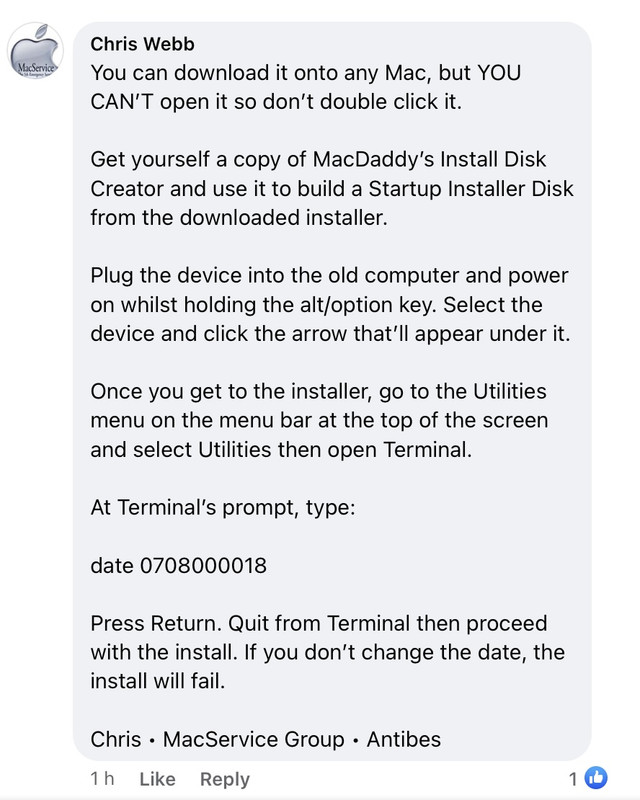
I found out some more information about installing previous versions of Mac OS on FB.
Possibly too late for you now but possibly worth knowing for the future?

Software linked here:
https://support.apple.com/en-gb/HT211683

Installer:
https://macdaddy.io/install-disk-creator/

Instructions - I’ve not tried this myself, just copied it from a post on FB. ;)

772-E3-DE4-2-F1-C-461-A-B2-C0-B2-FE488-ABAAF.jpg
 
Thanks for this..no, not too late. Dan kindly loaned me his Mavericks Installer but right at the end of my install it said 'Fail". Currently the Mac is in Download the os from the internet which, as we know know, isn't there.
 
Back
Top