• Hi all and welcome to TheWoodHaven2 brought into the 21st Century, kicking and screaming! We all have Alasdair to thank for the vast bulk of the heavy lifting to get us here, no more so than me because he's taken away a huge burden of responsibility from my shoulders and brought us to this new shiny home, with all your previous content (hopefully) still intact! Please peruse and feed back. There is still plenty to do, like changing the colour scheme, adding the banner graphic, tweaking the odd setting here and there so I have added a new thread in the 'Technical Issues, Bugs and Feature Requests' forum for you to add any issues you find, any missing settings or just anything you'd like to see added/removed from the feature set that Xenforo offers. We will get to everything over the coming weeks so please be patient, but add anything at all to the thread I mention above and we promise to get to them over the next few days/weeks/months. In the meantime, please enjoy!

Do we need more money in the meter ?

RogerS

Moderator
Staff member
Joined
Jul 21, 2014
Messages
15,493
Reaction score
1,223
Location
Somerset
Tried to upload an image. Only 3.7Mb ....uploaded then told 'File too large'. Strange as I've uploaded larger image files without problem. So shrunk it down to 1.6 Mb....still File too large ...puzzled here, am I.
 
Are you hitting the insert image icon on the top?...
I don't think that works for my computer.
Have you tried simply dragging the picture onto where your writing, that's one of the best things about the site upgrade.

All the best
Tom
 
Yes I had the same problem last week, I don’t know any fancy way of changing it so the thread never got started. Don’t have any idea as to size, it was just a photo taken by my iPhone.
Ian
 
What browser are you using, Ian ? And Mac or PC.
 
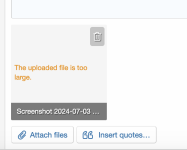
Nope. Still failing. Even dragging it directly into where I'm writing, same problem. 'Oops we ran into a problem. The file is too large"

Screenshot 2024-07-03 at 20.50.59.png
 
Tried Safari. Same problem. The filesize in the above post was 40kb and that worked. No idea.
 
Just posted up the three images in the Mission Ipossible thread. But only after reducing them all to under 500kb. Summat's up.
 
Anything to do with file type? Are the screen grabs .png files?
Dunno why this would make a difference just a thought.

 
Upload test
Anything to do with file type? Are the screen grabs .png files?
Dunno why this would make a difference just a thought.

you could be right but a bit of a limitation of the forum s/w if so
 
Interesting, this is a 22mb raw file. Loaded in under a minute.
Our techies are going to have a look at this Roger.

Too late for me to do anymore.


IMG_1370.jpeg
 
Yup. Sure does. Screenshots are png files. Not a happy bed companion AFAICS with Xenforo.
 
I think there must be an add-on for Xenforo that takes a png file but converts it automatically to jpeg.
 
Seems like a combination of file type and size. My smaller png loaded without a problem as did my much larger raw.
 
This isn't really a fix, but advice, why not convert png to jpg by save as? png is a ridiculously bloated file type (7MB png would be 500-700KB jpg, albeit with a small amount of quality loss). Although Alasdair isn't overly concerned with file sizes, it's still a bugbear of mine, so I'd question anyone deliberately choosing to upload a file of 7MB rather than shrink it to less than 1MB.

I'm sure Alasdair will have a look, but a brief Google by me suggests this isn't a new thing and there don't seem to be many add-ons (there are some but with mixed reviews as to effectiveness) nor much appetite to 'fix' it, as the fix is to save it to jpg.

🤷‍♂️
 
the reason why it is not encouraged by xenforo is because there are browser issues (or can be) with large .png
- a .png is designed around transparency and meant for small images like watermarks you place over other images
- a .jpg is the preferred graphic format for photos - highly compressible
- a .webp is the newer format designed by google to replace .png and .jpg - but not universally used
- a .svg is a scalable (line art) graphic which can be used also in browsers...

ideally people use the 'correct' format and at the smallest possible size - however in reality it is not always that simple - however I am surprised that screen shots as .png are that large - but yes, they will cause issues.

the only option is to find / download a simple app to allow you to convert them, I am sure that one will exist...
 
But UKW use Xenforo and they have an add-on I think because you can drag a png to the post and see that they convert to jpeg as part of the process
 
But UKW use Xenforo and they have an add-on I think because you can drag a png to the post and see that they convert to jpeg as part of the process


Which is what I did in my post above on Weds. 10.30 with a 6.3mb png.

It seems though that if the source png is too large it fails.
 
Apple saves screenshots as PNG by default: lossless compression, so its a sensible starting point. You can then export it in any format or size you like (I think jpeg export default is 80% but you can slide it to a low value). You can get a plug in tool for mac that auto converts png to jpeg but it's not really worth the bother imo.
 
Here is a nearly full-sized screenshot of my 27-inch iMac. The PNG file size is 3.2MB and I didn't do any editing to the image after the screen capture.

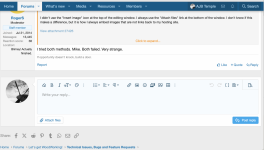
I didn't use the "Insert image" icon at the top of the editing window. I always use the "Attach files" link at the bottom of the window. I don't know if this makes a difference, but it is how I always embed images that are not links back to my hosting site.

Screen Shot 2024-07-05 at 14.11.35.png


Update: After submitting the post, I checked on the size of the uploaded image. This version of Xenforo resized my original 3.2MB image from 2557 x 1293 pixels to 1200 x 607 pixels at 733.77KB (which is fine with me).
 
Last edited:
Here is a nearly full-sized screenshot of my 27-inch iMac. The PNG file size is 3.2MB and I didn't do any editing to the image after the screen capture.

I didn't use the "Insert image" icon at the top of the editing window. I always use the "Attach files" link at the bottom of the window. I don't know if this makes a difference, but it is how I always embed images that are not links back to my hosting site.

View attachment 27426


Update: After submitting the post, I checked on the size of the uploaded image. This version of Xenforo resized my original 3.2MB image from 2557 x 1293 pixels to 1200 x 607 pixels at 733.77KB (which is fine with me).
I tried both methods. Mike. Both failed. Very strange.
 
Purely for the sake of interest the above was a shift ctrl 4 screen shot, just dragged off the desktop into the reply dialogue box, from a MacBook Pro running Big Sur 11.17.10. No issues. Wonder if you have a settings anomaly Roger.
 
If I do I have no idea (a) where to look or (b) how to fix it. I'm running Catalina and that could be the reason. But since I loathe the look and feel of the user interface of later OS versions, I can put up with the 'anomaly'.
 
I have always resized all images loaded here or elsewhere, as well as for an e-mail.

Use windows explorer to identify images, Ctrl click on all the images, right click then select send (Outlook) to e-mail, asks me what size, select smallest. Outlook opens the e-mail with the smaller images, right click to select all, copy to a folder for uploading later.
The large MB+ images will be deleted later. Save on disk space an back ups.
 
If I do I have no idea (a) where to look or (b) how to fix it. I'm running Catalina and that could be the reason. But since I loathe the look and feel of the user interface of later OS versions, I can put up with the 'anomaly'.
The Late 2009 iMac I used in my example is running High Sierra (10.13.6), which is the end of the line for my machine. However, it is still older than your version of Catalina (10.15.x).
 
Back
Top