
-
Hi all and welcome to TheWoodHaven2 brought into the 21st Century, kicking and screaming! We all have Alasdair to thank for the vast bulk of the heavy lifting to get us here, no more so than me because he's taken away a huge burden of responsibility from my shoulders and brought us to this new shiny home, with all your previous content (hopefully) still intact! Please peruse and feed back. There is still plenty to do, like changing the colour scheme, adding the banner graphic, tweaking the odd setting here and there so I have added a new thread in the 'Technical Issues, Bugs and Feature Requests' forum for you to add any issues you find, any missing settings or just anything you'd like to see added/removed from the feature set that Xenforo offers. We will get to everything over the coming weeks so please be patient, but add anything at all to the thread I mention above and we promise to get to them over the next few days/weeks/months. In the meantime, please enjoy!
You are using an out of date browser. It may not display this or other websites correctly.
You should upgrade or use an alternative browser.
You should upgrade or use an alternative browser.
laptop memory
- Thread starter wallace
- Start date

Windows
Old Oak
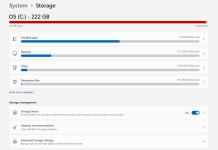
Of the categories listed, you’ve got about 160 GB. Leaving ~60 GB for the operating system files and the files associated with RAM (which at minimum will be the size of your RAM - 16 or 32 GB? - but may be larger if you never reboot your machine). It’s possible that everything listed is correct and that you have not much space left. Start by rebooting your machine and check again to see what if anything changed.
There’s a “show more categories” that you can click also.
There’s a “show more categories” that you can click also.
Just looked at mine. If you 'Show more categories' it will display 'System & reserved' which is what Windows was referring to. I only have 3 categories of any real size but they add up to total minus free.
I don't know how it works but the fact that you have Storage Sense enabled, and still run out of space suggests that there's nothing temporary or ephemeral that can be deleted. You may very well have to delete something permanent, or uninstall one or more apps.
Out of interest though, what do you keep on your Desktop that totals 37GB? I have an aversion to anything on my desktop, and always keep them empty. I miss the Quick Launch toolbar in Win 11.
I don't know how it works but the fact that you have Storage Sense enabled, and still run out of space suggests that there's nothing temporary or ephemeral that can be deleted. You may very well have to delete something permanent, or uninstall one or more apps.
Out of interest though, what do you keep on your Desktop that totals 37GB? I have an aversion to anything on my desktop, and always keep them empty. I miss the Quick Launch toolbar in Win 11.
Windows
Old Oak
I love to keep Tidy, Tidy B, and Tidy 3 folders on my desktop, nested to umpteen levels as I frequently create a new Tidy folder and sweep everything into it. I never create a Tidy IV because then the desktop wouldn’t be tidy. LOL.
fuse
Sapling
- Joined
- Sep 4, 2025
- Messages
- 353
- Reaction score
- 289
- Location
- Herefordshire UK
- Name
- Martin
- LOCATION
- Uk
Has a swapfile got onto that drive?
Unpurged cache from a lazy application like a web browser?
I ditched microsoft softwares when they finally nobbled xp
Now the tables have turned and my computers are slave to me
Unpurged cache from a lazy application like a web browser?
I ditched microsoft softwares when they finally nobbled xp
Now the tables have turned and my computers are slave to me
Last edited:

Pete Maddex
Old Oak
Have you run the cleanup? That should help.
Pete
Pete
I added extra RAM a while back, I think its 16 now, I also put in a 900g SSD. I rebooted the machine and gained a bit space.Of the categories listed, you’ve got about 160 GB. Leaving ~60 GB for the operating system files and the files associated with RAM (which at minimum will be the size of your RAM - 16 or 32 GB? - but may be larger if you never reboot your machine). It’s possible that everything listed is correct and that you have not much space left. Start by rebooting your machine and check again to see what if anything changed.
There’s a “show more categories” that you can click also.
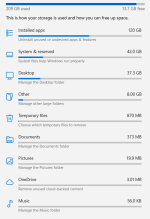
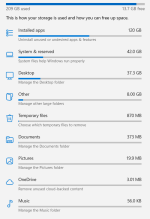
I still dont get the 120GB for apps, there is no where near that being used. The biggest is a game at 15GB, the rest are in the MB or KB range.
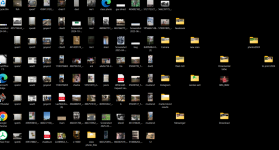
Simon my desktop is a bit a poop show, every so often I clean it up and move anything I want to keep onto the other drive. Then I back up that drive onto an external one.
Attachments
Windows
Old Oak
If there’s an option to see your list of apps ordered by size, take a look at that to see what the OS thinks is taking up the space. Otherwise, use the file explorer to list your program folders by size order. I’d be inclined to believe that something is taking up the space. Just need to track down which app it is.
(I’m afraid I haven’t used Windows for a decade so can’t point you to the best place to see the culprit beyond what I said above.)
Games or media apps that can download content would be likely suspects. Music creation software with samples, video creation software with canned title sequences, or image creation software with massive art libraries are also possible suspects if you use those.
(I’m afraid I haven’t used Windows for a decade so can’t point you to the best place to see the culprit beyond what I said above.)
Games or media apps that can download content would be likely suspects. Music creation software with samples, video creation software with canned title sequences, or image creation software with massive art libraries are also possible suspects if you use those.

Dr.Al
Old Oak
JDiskReport is really good for seeing what folders are taking up the most disk space.
Duncan A
New Shoots
I don't see how installing a 900GB SSD can add so little to your available storage.
Was the old one 256GB?
If so, I think it's possible that you've created, and are using, a partition of the same size, leaving 600GB unused.
File Explorer may show, for example, a D: drive with loads of space. Alternatively, whatever your version of Windows uses to format and partition storage drives may give a full picture.
Was the old one 256GB?
If so, I think it's possible that you've created, and are using, a partition of the same size, leaving 600GB unused.
File Explorer may show, for example, a D: drive with loads of space. Alternatively, whatever your version of Windows uses to format and partition storage drives may give a full picture.
Pete Maddex
Old Oak
Disk manager will show the disks and partitions.
Pete
Pete
If you've added a 900GB SSD then as mentioned above, either it's improperly formatted or you've got a D: of 700GB.
You should ideally use your C: for the OS and install apps and save your data to a D: partition to keep things clean. Open file explorer and show us a pic of your drives down the left had side.
Or, type in 'drive' into the search box and open up 'Defragment and optimize drives'. This will open the drive manager and show you what drives and partitions you have.
DO NOT defrag or optimise anything, just use it to confirm how your drives are partitioned.
You should ideally use your C: for the OS and install apps and save your data to a D: partition to keep things clean. Open file explorer and show us a pic of your drives down the left had side.
Or, type in 'drive' into the search box and open up 'Defragment and optimize drives'. This will open the drive manager and show you what drives and partitions you have.
DO NOT defrag or optimise anything, just use it to confirm how your drives are partitioned.

Phil
Old Oak
I use Avira for my anti virus and system protection.
Run a 'Smart scan' which identifies privacy issues, performance issues, viruses, outdated apps, network threats.
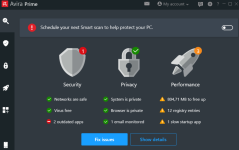
I then let it Fix Issues, clean up and delete files in recycle.
The outdated Apps is normally W11, Chrome.
I would then re-start the laptop.
W11 is not that stable IVHO
Lots of good advice already given above.
Run a 'Smart scan' which identifies privacy issues, performance issues, viruses, outdated apps, network threats.
I then let it Fix Issues, clean up and delete files in recycle.
The outdated Apps is normally W11, Chrome.
I would then re-start the laptop.
W11 is not that stable IVHO
Lots of good advice already given above.