• Hi all and welcome to TheWoodHaven2 brought into the 21st Century, kicking and screaming! We all have Alasdair to thank for the vast bulk of the heavy lifting to get us here, no more so than me because he's taken away a huge burden of responsibility from my shoulders and brought us to this new shiny home, with all your previous content (hopefully) still intact! Please peruse and feed back. There is still plenty to do, like changing the colour scheme, adding the banner graphic, tweaking the odd setting here and there so I have added a new thread in the 'Technical Issues, Bugs and Feature Requests' forum for you to add any issues you find, any missing settings or just anything you'd like to see added/removed from the feature set that Xenforo offers. We will get to everything over the coming weeks so please be patient, but add anything at all to the thread I mention above and we promise to get to them over the next few days/weeks/months. In the meantime, please enjoy!

Loving my new Chromebook.

selectortone

Sapling
Joined
Jan 26, 2017
Messages
288
Reaction score
0
Location
Sunny Bournemouth by the Sea
I have been getting more and more fed up with Windows, especially Windows 10 and its interminable updates. I quite like Apple computers (we had them at the guitar store where I used to work) but they are way too expensive.

I have a Windows 7 laptop. I've had many laptops. It's an Asus K53e with an i5 processor and 6Gb ram - plenty powerful enough, one would think, for average home pc requirements. And indeed, when I first got it it absolutely flew. But like all PCs it just got slower and slower as it bogged down with all the crap Microsoft stuff down the pipe into it every month. I'm reasonably PC literate (I used to sell industrial PC-based control systems) and have done all I can to keep it as lean as possible but about 6 months ago I bit the bullet and bought a new machine, same spec but running Windows 10.

Well.... I just can't get on with 10. Maybe I'm getting old, but is it really necessary to wait for half an hour every week or so while the damn thing updates before you can get on with something productive? And the interface is pants. Nope, not for me.

So... I do more and more stuff on my (android) phone nowadays - it just turns on and goes, rarely wants to update itself, and these days there's an app for just about everything I could ever want do in my normal day. So I've been thinking for some time, wouldn't it be great to have a laptop that ran like my phone. I tried a tablet with a bluetooth keyboard, that worked OK, but I like the laptop form factor and larger screen size. Hey, I'm an old curmugeon. After 30 odd years I'm a laptop guy.

I've been reading a lot about chromebooks. They started off a few years ago as a bit of a curiosity, but have established a firm foothold in schools and colleges because of their low price and suitability for group working and cloud computing. Then they introduced the ability to run android apps and they really caught my attention. So this week I bit yet another bullet and bought one of these.

And I couldn't be happier with it. I'm writing this post with it and it's just as easy and convenient as my old laptop. Or rather it isn't, it's WAY better - it starts up in seconds, runs all my phone apps, all metal build, thin and light and has built in virus protection. For my daily stuff - email, internet, banking, youtube, it is absolutely fabulous. It flies. It took literally minutes to configure - just wanted to know my wifi password and my google account details, and off it went. Just like my phone but in a more usable form factor. If you use Chrome browser and use Google Drive for word processing and spreadsheets like I do, then guys, this is for you.

Yes I know, it'll never run autocad or photoshop or 3D grahics programming (actually the way they are going...never say never) but then that's not what I want out of a laptop.

When you consider the processing power my laptops needed to run windows compared with this it's crazy. It's so stripped down and elegant. It may be part of Googles plan to rule the world but hey, I'm going with the flow. I just love it.
 
Ooo.... I'm a Mac user, Android phone user... And Google mail, photos, drive user etc. across both platforms.

Been eyeing up a Chromebook for knocking about with.

Thanks for the post [emoji3]

Sent from my Moto G (5) using Tapatalk
 
I respect a man who can call himself a curmudgeon!!

Check its spellchecker! :D

I get you, but I went Mac.
 
That does look like a simple solution and reminds of an updated dumb terminal connected to a mainframe with the mainframe in this instance being the cloud.

Sympathise with win10 and updates.
 
I'm quietly smug about my moto G5... It's brilliant, full of features and... as cheap as chips. It does pretty much everything a Flagship phone does for a 5th of the price.

Amazed I don't see more when I'm out and about!

The shake gestures (camera+torch) I couldn't do without!
selectortone":g7qaskoj said:
Jimmy Mack":g7qaskoj said:
Sent from my Moto G (5) using Tapatalk

Hey - a fellow Moto G5 user. Obviously a discerning shopper. [emoji14] . You'd LOVE a chromebook.

Malc... [emoji38]

Sent from my Moto G (5) using Tapatalk
 
Andyp":3l5ktncz said:
That does look like a simple solution and reminds of an updated dumb terminal connected to a mainframe with the mainframe in this instance being the cloud.

Indeed. When I first started in the process controls industry back in the early 80s factory processes were controlled by DEC PDP11s, small IBM mainframes and the like, with dumb terminals out on the factory floor. Over the years control systems morphed into networks of industrial PCs running SCADA software on Windows NT supervising PLCs. Now, with the internet and cloud computing it's all going full circle. "Thin clients" was the buzz word when I packed it in in 2005 after my wife got sick. You don't get much thinner than a chromebook!
 
Terry, looks like a nice laptop.

How many USB ports does it have and can one plug in an exterior keyboard & screen as well?
 
I've been using a Chromebook for about five years+ now (in addition to a Windows machine (QuietPC - HIGHLY recommended!).

The great thing about the Chromebook is even after 5 years (+), it still shows no signs of slowing down, the battery failing, anything. It's as good today as it ever was and for web browsing it keeps up with my much more powerful desktop.

Great choice.
 
Terry,
Can you work on word, excel etc offline without having office 365? ( which would defeat the object of having a chomebook). From what I am reading this seems unlikely.
 
Slightly OT but my Word 2007 running on Win 10 now “authorises” each time before use which takes an age. It never used to do.

Rod
 
Andyp":419tmclb said:
Terry,
Can you work on word, excel etc offline without having office 365? ( which would defeat the object of having a chomebook). From what I am reading this seems unlikely.

I'm not sure Andy. Don't know anything about Office 365. I know that you can use Google Docs and Sheets offline, and they can import MS .doc and .xls files. There's also a Google Powerpoint clone called Slides but since I'd rather be boiled in oil than ever give another Powerpoint presentation again I haven't explored that app. Haven't used Microsoft Office products for over ten years now - I used Open Office on my PCs after I exited the rat race and since I got into android via my phone I've been using Google's offerings.
 
Thanks Terry,
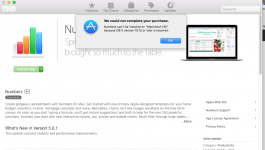
Since MS office for Mac is no longer supported and I refuse to pay for a subscription service I have been half looking at alternatives. I wont give up the Mac but to use Numbers I need OSX10.12 (sierra or highsierra) and I am quite happy with OSX 10.11 (El Capitan). My ageing iMac may well struggle.

Google docs and sheets is an alternative which I had not considered before and is also a definite option for the children's forthcoming needs via chromebooks rather than the godawful Win10 laptop my eldest has.

No need for power point or equivalent but I do like to a spreadsheet for domestic purposes and the ability to write a letter.
 
We’ve been using Open Office on our iMac for many years Andy, it works well enough for all we need to do. When we get a new IMac we will of course be using Apples free productivity apps.
 
Andyp":27m2brdr said:
..... but to use Numbers I need OSX10.12 (sierra or highsierra) and I am quite happy with OSX 10.11 (El Capitan). My ageing iMac may well struggle.

.....

Ummm...no you don't. Numbers has been available for yonks across all the old versions of OSX. I'm currently running Numbers on El C.
 
Ah...I see the problem. I'm on Numbers 3.2.2 as I have iWorks '09 and guess that as I migrated OS, I got it ported over. Is there anything specific in Numbers 5 that you need ? If not then maybe I can work out a way to get iWorks '09 across to you
 
Thanks Roger. I am not in desperate need of numbers but ever since MS stopped supporting Office for Mac I have been half heartedly looking for an alternative. I know I can use libre office and in fact the girls use LO on the mac for school work.
I just dont like change but I know I will have to one day.
 
Woodster":2dvmg58f said:
We’ve been using Open Office on our iMac for many years Andy, it works well enough for all we need to do. When we get a new IMac we will of course be using Apples free productivity apps.

Thanks Woodster. I have libreoffice on the mac already which the girls use for homework so that is an option.
 
Andyp":2ljlea93 said:
Thanks Roger. I am not in desperate need of numbers but ever since MS stopped supporting Office for Mac I have been half heartedly looking for an alternative. I know I can use libre office and in fact the girls use LO on the mac for school work.
I just dont like change but I know I will have to one day.

Why do you care that it’s supported? So long as it works...

I’m still using it and couldn’t give a monkey’s whether they support it or not.
 
Fair point Mark. I guess security is my main worry. I would like to think that I will not be duped by dodgy email attachments but I am not the only user. I also know that OSX is less likely to suffer but one be can never be sure.
If Numbers had been easily available I would have liked to have tried it. Maybe Openoffice and LibreOffice are no more secure than an out of date Office for Mac.
 
I run W-7 on the laptop and use Office 2007.
Already had a message that they will no longer support O-2007.

If they stopped supporting W-7, my only concern would be security.

I certainly have no intention of joining their subscription service, hence the interest in Chromebook.
Mac does not feature in my budget unfortunately. :(
 
Andyp":1j1z5met said:
Fair point Mark. I guess security is my main worry. I would like to think that I will not be duped by dodgy email attachments but I am not the only user. I also know that OSX is less likely to suffer but one be can never be sure.
If Numbers had been easily available I would have liked to have tried it. Maybe Openoffice and LibreOffice are no more secure than an out of date Office for Mac.

You might not be duped by dodgy email attachments but rest assured that you can be duped by dodgy macros inside Word and other MS Office documents. As far as I can see there is no way that you can - via a password - permanently disable the auto-running of these macros. So thinking that MS Office is secure is a road strewn with potholes.

It would appear that OpenOffice, on the other hand, is easily adaptable to permanently remove the files needed to do this and on the face of it would suggest it was a more secure option. Don't know about LibreOffice.
 
Just read a few articles which suggest that LibreOffice is used a lot by governments around the world and it is better supported and maintained than OpenOffice. Difficult to verify these statements obviously but as I have it on the Mac I think I will try and use it for a couple of months with the intention of ditching Office for Mac in the future.
 
Phil":2tpyd2iq said:
....
Mac does not feature in my budget unfortunately. :(


A new one ..maybe not...but the refurbished ones from Apple are discounted (a bit) and secondhand ones are usually in very good condition and depending on the year reasonably priced.
 
I've been using LibreOffice for the past year now and it is pretty good. Not as polished as office, but it does what I need it to.
 
MJ80":3vkdn3rp said:
I've been using LibreOffice for the past year now and it is pretty good. Not as polished as office, but it does what I need it to.


:text-+1:

Moi, aussi!

I tend to use a mixture of Mac's own and Libre Office - I've used the WP, the SSs and the Presentations on both and if one doesn't do it how I want it, I have a go on the other.

It's good to have a choice.
 
Yeah if my Missus tries to do something and it wont work I'd better be standing close to the window to catch the Mac.
She tells me her company and upgrading to Win 10 soon. :lol:
 
Depending on your needs you could consider downloading Power BI. It's a different beast to Excel / normal spreadsheets but arguably what Excel should always have been. I use the Excel add-in (Power Query) to blend and manage a data warehouse containing about 8m data points but it's equally at home on smaller tasks.

Requires a different mindset but it's far more intuitive than spreadsheets.
 
themissingelf":1nkn3550 said:
Depending on your needs you could consider downloading Power BI. It's a different beast to Excel / normal spreadsheets but arguably what Excel should always have been. I use the Excel add-in (Power Query) to blend and manage a data warehouse containing about 8m data points but it's equally at home on smaller tasks.

Requires a different mindset but it's far more intuitive than spreadsheets.


I'm not sure, but you might need MS office for Power BI.

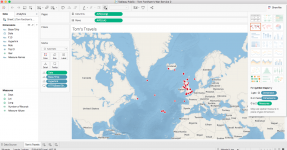
I haven't, and so I used Tableau - https://www.tableau.com/products/desktop - and it's online.
 
Malc2098":26p0b0ps said:
themissingelf":26p0b0ps said:
Depending on your needs you could consider downloading Power BI. It's a different beast to Excel / normal spreadsheets but arguably what Excel should always have been. I use the Excel add-in (Power Query) to blend and manage a data warehouse containing about 8m data points but it's equally at home on smaller tasks.

Requires a different mindset but it's far more intuitive than spreadsheets.


I'm not sure, but you might need MS office for Power BI.

I haven't, and so I used Tableau - https://www.tableau.com/products/desktop - and it's online.

May be so. Tableau is also very good but I thought it was just free for a trial period? We bought licenses for Tableau but reverted to Power Query / Power BI because both are free (notwithstanding the question re having Office). Tableau were charging a lot for server based corporate solutions and their position in the market was slipping vs. MS so it was a no-brainer given our circumstances. Still a good product.
 
Ha! You must be right, TME!

I just tried to log in and was told I don't exist!! :lol:

But I've still got the app which I've just updated and can see my previous work.

Tableau Public and Reader are still free.


Screen Shot 2018-05-28 at 17.27.51.png
 
Back
Top