• Hi all and welcome to TheWoodHaven2 brought into the 21st Century, kicking and screaming! We all have Alasdair to thank for the vast bulk of the heavy lifting to get us here, no more so than me because he's taken away a huge burden of responsibility from my shoulders and brought us to this new shiny home, with all your previous content (hopefully) still intact! Please peruse and feed back. There is still plenty to do, like changing the colour scheme, adding the banner graphic, tweaking the odd setting here and there so I have added a new thread in the 'Technical Issues, Bugs and Feature Requests' forum for you to add any issues you find, any missing settings or just anything you'd like to see added/removed from the feature set that Xenforo offers. We will get to everything over the coming weeks so please be patient, but add anything at all to the thread I mention above and we promise to get to them over the next few days/weeks/months. In the meantime, please enjoy!

Mac help

Stuart

Sapling
Joined
May 21, 2021
Messages
385
Reaction score
92
I've been struggling with this one for a while and despite quite deep diving on google and apple sites haven't managed to find a solution.

All our music and photos were downloaded from our old windows based machine onto a hard drive and then loaded onto the Mac. For some reason the photos are a complete mess in terms of order, date taken etc. so the carefully laid plan to take them all off, sort out the hard drive so everything is as it should be and then consider reloading (might, might not).

However, the hard drive appears to be locked for any form of editing and no matter what I try it simply won't let me edit anything on the drive (Seagate 1 Tb). For example , there are some old, rubbish sketches files that can be deleted but it won't let me.

I've tried all the permissions and I'm logged on to the Mac as administrator.

Here's a screenshot of the drive's properties:
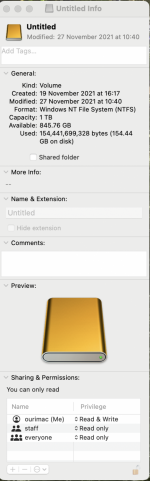
Screenshot 2022-11-07 at 12.10.16.png

I can unlock the padlock (bottom right) with the admin password but I still can't make any changes. Double confused because it says I have read and write access! I know there are some Mac wizards on here so would value any help or guidance.
 
Before you decided to use this as a Mac linked drive, did you format it for Mac compatibility?

It suggests that it is still being seen as a Windows drive (NTFS) and the Mac OSX will not edit that.

My starting point would be to get another drive, format that for whatever OSX variant you are using, put a few things on and test that you can edit, then transfer all your ex windows files over.
 
It's been a while but I think this is a Windows problem. Connect it back to the Windows machine and make sure you eject it correct, System Tray, USB, Eject drive x
Hope this helps.
Mark
 
AJB Temple":22swv5nn said:
My starting point would be to get another drive, format that for whatever OSX variant you are using, put a few things on and test that you can edit, then transfer all your ex windows files over.

That’s what I would have done but it needs a format that both machines are happy with, such as used on common USB sticks. Apple has several options but I can’t remember off hand. FAT 32 used to be one I think?

I had a play around hooking up an external hard drive to my iPad and I had to try one or two different formats before it would work. Luckily this is all easy to do on a Mac.
 
Stuart":1jkegfmg said:
I've been struggling with this one for a while and despite quite deep diving on google and apple sites haven't managed to find a solution.

All our music and photos were downloaded from our old windows based machine onto a hard drive and then loaded onto the Mac. For some reason the photos are a complete mess in terms of order, date taken etc. so the carefully laid plan to take them all off, sort out the hard drive so everything is as it should be and then consider reloading (might, might not).

However, the hard drive appears to be locked for any form of editing and no matter what I try it simply won't let me edit anything on the drive (Seagate 1 Tb). For example , there are some old, rubbish sketches files that can be deleted but it won't let me.

I've tried all the permissions and I'm logged on to the Mac as administrator.

Here's a screenshot of the drive's properties:


I can unlock the padlock (bottom right) with the admin password but I still can't make any changes. Double confused because it says I have read and write access! I know there are some Mac wizards on here so would value any help or guidance.

It does say near the bottom that you can only read. Have you tried changing all permissions to read & write?
 
AJB Temple":t4vcqly9 said:
Before you decided to use this as a Mac linked drive, did you format it for Mac compatibility?

It suggests that it is still being seen as a Windows drive (NTFS) and the Mac OSX will not edit that.

My starting point would be to get another drive, format that for whatever OSX variant you are using, put a few things on and test that you can edit, then transfer all your ex windows files over.
No I didn't as it was my windows backup so I just transferred to Mac.

I think it's one of those 'Oh buh-ger' moments as I no longer have access to a windows machine.

I might format the hard drive using this Mac and then reload from here and see how I get on. I know I won't loose anything. I can always use my Time Machine drive as a second back up.

Thanks for the comments and help.
 
Adrian has it right - MacOS can't write to NTFS drives without a third-party add-on, which may or may not cost non-trivial money. You have basically two options - either plug in a new drive, format it for native Mac use, copy everything to that, and then edit away, or copy all the files off the NTFS drive, format it for Mac use (erasing everything on it in the process), and copy them back into the form you want.
 
Who makes the drive? If it’s seagate, I think you can download some software from their site to allow writing to NTFS from Mac.
 
Woodster":3i62l9z0 said:
As I alluded to, Macs and PC’s can both use FAT32 and ExFAT.
Doesn't help if you no longer have access to a Windows machine, which Stuart previously said is the case.

Also, both Mac and Windows lose a lot of capability when using any of the FAT derivatives, as the filesystem doesn't support a lot of the features (starting with file permissions and going from there) that they're designed to work with. It's not a good long-term solution on any platform.
 
spb":2xqspjp4 said:
Woodster":2xqspjp4 said:
As I alluded to, Macs and PC’s can both use FAT32 and ExFAT.
Doesn't help if you no longer have access to a Windows machine, which Stuart previously said is the case.

Also, both Mac and Windows lose a lot of capability when using any of the FAT derivatives, as the filesystem doesn't support a lot of the features (starting with file permissions and going from there) that they're designed to work with. It's not a good long-term solution on any platform.

I’m aware of that and was not suggesting it for long term use just as a quick and easy option to transfer his files.
You can format hard drives connected to a Mac to many different formats including FAT32 and ExFAT.
 
Thank you for the very helpful suggestions and links. I have to say that quite often when people use I.T. speak I generally hear 'blah, blah, blah' as my understanding of anything other than basics is poor to say the least.

I'm reluctant to mess about too much with this drive as I have no 'organised' backup and don't want to screw up what's there if I can help it. I'm also reluctant to download software that requires alterations to the security side of life (Seagate requires this).

I'd forgotten about an old external hard drive I had in a cupboard so am hopeful that formatting this for Mac will enable me to do what I want to do with some drag and drop. Just have to wait for an adapter to arrive so I can have two plugged in at the same time.

I suppose a simple question is will a file dragged from the windows formatted drive be editable when on a Mac formatted drive or will it remain locked? I'll find out soon!

Thanks again.
 
Stuart":3o6hd55i said:
I suppose a simple question is will a file dragged from the windows formatted drive be editable when on a Mac formatted drive or will it remain locked? I'll find out soon!

Thanks again.

It'll be editable. By dragging it from one disk to another you're making a new file that contains the same data as the old one; since that new file is on a disk that's native for Mac, you'll have no problems editing it.
 
RogerS":3jynwu01 said:
Is this any use, Stuart ? May have been covered already.

https://toolbox.easeus.com/ntfs-mac-tip ... drive.html

Luckily I no longer have to deal with PC’s but that’s still an interesting link Roger. I rarely use Terminal but I think I’d use that rather than download additional software, at least for a one off.

Going off topic, anyone know why a spinning portable external HD shows up as a solid state drive on our M1 iMac?
 
Back
Top