• Hi all and welcome to TheWoodHaven2 brought into the 21st Century, kicking and screaming! We all have Alasdair to thank for the vast bulk of the heavy lifting to get us here, no more so than me because he's taken away a huge burden of responsibility from my shoulders and brought us to this new shiny home, with all your previous content (hopefully) still intact! Please peruse and feed back. There is still plenty to do, like changing the colour scheme, adding the banner graphic, tweaking the odd setting here and there so I have added a new thread in the 'Technical Issues, Bugs and Feature Requests' forum for you to add any issues you find, any missing settings or just anything you'd like to see added/removed from the feature set that Xenforo offers. We will get to everything over the coming weeks so please be patient, but add anything at all to the thread I mention above and we promise to get to them over the next few days/weeks/months. In the meantime, please enjoy!

Video buffering.

Is it exactly the same in a firefox private window? (right click your bookmark and select open in new private window)

Also it looks like a very zoomed in youtube page

This is my entire screen........Youtube in a Private window:
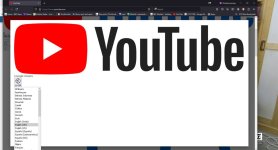
Capture 5.JPG
 
My understanding of Malwarebytes, at least as I have it installed, is that it does nothing until I run a scan. I am not aware of it being active at any other stage. I'll turn it off (or even delete it) this evening and run Task Manager, as you suggest.
Well in theory it can/should also be running in the background scanning for potential breaches, but maybe it doesn't work that way. I've not looked closely at it tbh so could be wrong...
 
With Malwarebytes, I believe the free version does not run in the background (so they say there is no real time protection) but in the paid for version it does. My (limited) experience of this type of software is that it always has something running and has to be actively disabled. On a Mac this is easily checked in Activity Monitor, not sure on PC now as I am rusty.
 
With Malwarebytes, I believe the free version does not run in the background (so they say there is no real time protection) but in the paid for version it does. ....

Yes, that's my understanding. And I do only have the free version.
 
Is it re-starting as one of the start up applications each time you reboot though Mike? You must have done a lot of re-starts of the PC by now.
 
Is it re-starting as one of the start up applications each time you reboot though Mike? You must have done a lot of re-starts of the PC by now.
You just beat me to it as I suggested some time ago that the start menu should be scrutinised and unwanted programs disabled or deleted. It's one of the first things I do after a re-install and I check mine regularly in case something sneaks in.
E.G. There are currently 16 programs in my start menu of which 11 are disabled.
 
I don't know, Adrian. I don't think so, but I can't check without doing another start-up.......and I'm in Safe Mode ATM, so reluctant to exit and start again.
 
Hi Mike, I hope you're making some progress.
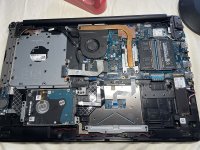
Just to give you palpitations :ROFLMAO: though it doesn't help you at all, I needed to swap out the keyboard on my Dell laptop this morning as it's been playing up. Not a problem with most that have separate keypads but this is the whole panel which meant every component being removed, motherboard, speakers, the whole lot and they are crammed in. It took me about an hour so not so bad but I haven't stripped one out fully so it was a bit daunting.
 

Attachments

  • IMG_2335.JPG
    IMG_2335.JPG
    355.8 KB · Views: 8
At least it's the physical world, Bob. :) I reckon to be able to muddle by with most things in the physical world. The digital/ electronic world remains a deep mystery. Nonetheless, rather you than me!
 
If you've not tried it yet, I'd seriously suggest removing Avast and seeing whether that helps. Not temporarily disabling it, if that's an option - I'm talking about complete removal. There are reasons for that which I can go into if you want.

One of the big things that Safe Mode does is to disable any third-party programs that hook into various parts of the operating system - like anti-virus software - and in your case Safe Mode seems to fix the problem, so the culprit has to be one of the things that Safe Mode removes.

I know that's historically been a scary suggestion, but in Windows 10 and 11 the built-in Defender really does do everything that you need if you're not a corporate IT department. The legacy AV vendors obviously want you to think they're still important, but for home purposes it's really not necessary any more and they're fighting a losing battle to hang on to a disappearing market.
 
If you've not tried it yet, I'd seriously suggest removing Avast ......
Well, b***** me. It worked.

Thanks Stephen (and anyone else who might have suggested that earlier).

Now, can anyone tell me whether Defender is actually enabled automatically, or do I have to do something? I'm off to install UBlock Origin as suggested by Andy. Not having an Adblocker has been a painful experience these last 2 or 3 days.
 
Now, can anyone tell me whether Defender is actually enabled automatically, or do I have to do something?
It's enabled by default, but you can't rule out that Avast might have turned it off and not re-enabled it.

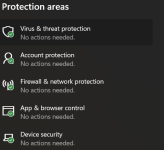
You can check fairly easily: open Settings, choose 'Privacy & Security' from the left-hand menu, then the top item should be 'Windows Security'. Opening that will give you a summary of the built-in security features. If it looks like this:

1728751063393.png
...with all those green tick marks, then those protections are enabled. If you see a red cross:
1728751115579.png
...then something's turned off, and you'll need to go in and re-enable it. We can get into how to do that if it turns out to be necessary.
 
Well, b***** me. It worked.

Thanks Stephen (and anyone else who might have suggested that earlier)..................

That's excellent, hopefully now you can breath a huge sigh of relief.

Avast will have left files behind in your system though it probably won't matter in your case, I usually do a full search and delete them manually or more often these days I use Revo Uninstaller to delete completely.

AV vendors obviously want you to think they're still important, but for home purposes it's really not necessary any more and they're fighting a losing battle to hang on to a disappearing market.

Isn't that the truth Stephen, I get bombarded especially from Mcafee though some of them are fake Phishing emails.
 
You can check fairly easily: open Settings, choose 'Privacy & Security' from the left-hand menu, then the top item should be 'Windows Security'. Opening that will give you a summary of the built-in security features.
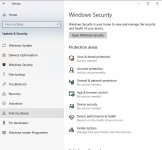
Naturally, it requires more work......


Capture 6.JPG
 
Excellent :)

I did mention Avast in post 106 but not with confidence.

Those actions required are probably updates and a scan for one and backup for the account.
 
Oh, the joys of running a PC :cool:

Glad you got it sorted, Mike
 
Naturally, it requires more work......
Not to worry - modern Windows tries hard to make it as easy as possible to set things up how they think you should, and that means all Defender protections enabled, which is what you want here.

Click on the 'Virus & threat protection' tile that's showing the red X, and it'll open the part of Windows Security Centre that contains those settings. For each area which isn't in the recommended state, there will quite likely be a prominent button labeled 'Turn on' or similar. Click that to let it restore things to recommended settings. It'll prioritise and only show you one button at a time, so it's quite possible that after clicking it the button will reappear with a different description, if there are multiple things turned off. Once it stops showing you warnings and buttons to fix the warnings, you're done.

Once you've got everything re-enabled in Virus & threat protection, you can repeat the process in Account protection.

You're aiming here to restore everything to how Windows thinks it should be, so you have the luxury of letting it guide you instead of having to fight against what it thinks you should want. Of course if anything doesn't match what I've described or is just excessively confusing, just post another screenshot and we'll figure it out.
 
All sorted, Mark, thanks.

I looked up "how to enable Defender", and followed the instructions. I swapped from Adblock Plus to UBlock Origin. Everything is running really well, as before, although UBlock origin has a couple of minor quirks I just need to get used to.

A huge thanks again to everyone who gave so freely of their time and knowledge.
 
Back
Top