• Hi all and welcome to TheWoodHaven2 brought into the 21st Century, kicking and screaming! We all have Alasdair to thank for the vast bulk of the heavy lifting to get us here, no more so than me because he's taken away a huge burden of responsibility from my shoulders and brought us to this new shiny home, with all your previous content (hopefully) still intact! Please peruse and feed back. There is still plenty to do, like changing the colour scheme, adding the banner graphic, tweaking the odd setting here and there so I have added a new thread in the 'Technical Issues, Bugs and Feature Requests' forum for you to add any issues you find, any missing settings or just anything you'd like to see added/removed from the feature set that Xenforo offers. We will get to everything over the coming weeks so please be patient, but add anything at all to the thread I mention above and we promise to get to them over the next few days/weeks/months. In the meantime, please enjoy!

Workshop Uses for 3D Printing

There's something quite satisfying about coming home from work to find things sitting on the printer...

Today I got home to these:

chuck_jaw_mount_on_bench.jpg

and this:

corner_chisel_mount_on_bench.jpg

The latter has a weird shaped hole to help wall-mount a corner chisel:

corner_chisel_mount.jpg

The former hangs on the front of my lathe and gives me somewhere to store the two sets of chuck jaws that aren't in the chuck at any point:
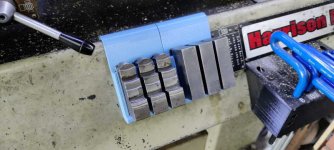
chuck_jaw_mount.jpg
 
20220528_203015.jpg

So here's part of the reason i went cheaper but still good. Today I retrofitted autobed leveling for the grand total of 13 quid. Along with a glass bed from an old IKEA mirror. I could have bought an ender or similar for more money to get these features but then I wouldn't have had this fun. I'm now thinking a different hotend, again I wouldn't have dared on a more expensive machine (I don't need a different hotend, but I can fit one that will make parts cheaper in the future).
 
Dr Al,

could you give me a little guidance, please. I have a project in mind which would need need some parts making on a 3d printer, and before I design them I want to know what limits I am designing within. On a set-up like yours, what is the maximum size of the piece you can make? Is it possible to have "shapes" on all faces, or is it necessary to have something flat-ish on the bottom? One of the things I have in mind needs to be pretty strong, so is it feasible to have flat parts made up in thicknesses of 8 or 10mm, say?

Thanks for any help you can give.
 
Mike, I'll leave specific answers to others but just wanted to point out you can play with 3D printing without having to buy a printer.

Download and install cura which is a free 'slicing' program. It converts your model into printing layers and more importantly for you can show you what will work.

https://ultimaker.com/software/ultimaker-cura

You will have to tell it what printer to prepare files for just choose one. Mine is a Ender 3 V2.

Your drawing program needs to export .stl files for cura to slice.

You can also download other peoples models from places like thingyverse to see how they slice.
 
Mike G":4jmqq5z0 said:
Dr Al,

could you give me a little guidance, please. I have a project in mind which would need need some parts making on a 3d printer, and before I design them I want to know what limits I am designing within. On a set-up like yours, what is the maximum size of the piece you can make? Is it possible to have "shapes" on all faces, or is it necessary to have something flat-ish on the bottom? One of the things I have in mind needs to be pretty strong, so is it feasible to have flat parts made up in thicknesses of 8 or 10mm, say?

Thanks for any help you can give.

Hi Mike

The build area for my printer is 250x200x200 if memory serves me correctly (200 high).

You can have shapes on all faces, but the finish won't be as good if the bottom isn't largely flat. It's hard to generalise, but if an edge tapers at about 50° from horizontal, it'll be okay. If it's a shallow taper or a surface that's "floating" above the build plate, the finish will suffer a bit. For small "floating areas", the printer will bridge the gap (which leaves a rough finish but is easy); for bigger areas supports are needed and those supports need removing afterwards.

If there's minimal contact with the bed, it can affect adhesion, but there are ways of dealing with that (printing a "brim" around the contact points that is cut off later).

You can print big thick areas, but it's a bit of a waste of plastic. The usual approach would be to print a few layers around the outside & print some form of infill in the middle. As I understand it, the strength of an infilled component isn't that different to a solid. There's a useful article on this topic here: https://help.prusa3d.com/article/infill-patterns_177130

It's hard to come up with hard & fast rules, but feel free to send me a sketch & I'll see if I can be more specific. If email is easier my address is al@ my domain without the www bit. I'll trust you can figure the last bit out!
 
Thanks guys........very useful. At the moment these are just pencil sketches, and various scattered thoughts in my brain. I'll narrow in on things in the next week or two, and may then send an email, Dr Al.
 
Mike G":2t944kgv said:
Thanks guys........very useful. At the moment these are just pencil sketches, and various scattered thoughts in my brain. I'll narrow in on things in the next week or two, and may then send an email, Dr Al.

d764a4e5db338da88e2b9577a4470b2b.gif
 
Mike G":2gvpz9yb said:
Thanks guys........very useful. At the moment these are just pencil sketches, and various scattered thoughts in my brain. I'll narrow in on things in the next week or two, and may then send an email, Dr Al.

It's probably also worth mentioning that if you want something to be strong, it'll be much stronger if the the strength needs to be across a layer. For example, if you were printing something out that's a simple cuboid, 100 mm long with a 30 x 5 mm cross section and you plan to mount it at one end of the 100 mm length and hang stuff off the other end, it'll be strongest if you print it flat on the bed rather than standing upright. Layer-to-layer adhesion isn't anywhere near as good as along-the-extruded-filament adhesion if that makes sense.
 
Lots of L-shapes involved with stiffness required in both directions, so this would need a good think.
 
Mike G":3i7piy6h said:
Lots of L-shapes involved with stiffness required in both directions, so this would need a good think.

Well, you've got two strong directions: it's only the third that's a bit weaker (although strong in compression).

Sometimes it is based to make parts in multiple pieces to get the best orientation & then fix them together.
 
These bits:

bits_on_the_bed.jpg

Which turned into this perpendicular drilling jig:

pillar.jpg

The design calls for some springs which I haven't added yet. I'll have a play with it and see whether I think they're necessary. I don't think I'm going to throw away the pillar drill any time soon, but it could be handy for some situations. The depth stop works a lot better than I thought it would.

Link to the design (not mine) if anyone's interested: https://www.printables.com/model/217743 ... illing-jig
 
My new bandsaw has a very neat cam-action blade tensioning thing so that it's easy to take the tension off the blade when not in use and then get it back to the same tension again. While that's a great idea, it introduces a risk of me forgetting to tension the blade before starting the motor.

Hopefully this will help:

tension_back.jpg

tension_front.jpg

It goes here:

start_stop.jpg

Like this (held on with magnets):

start_stop_covered.jpg
 
Car related rather than workshop but thing no. 2 complained of excessive hair movement.
 

Attachments

  • IMG_20220720_192010_174.jpg
    IMG_20220720_192010_174.jpg
    414 KB · Views: 5,035
Another fairly quick print. I've no doubt these would be quite easy to make out of (4.75 mm thick!) wood, but 3D printing them was easy and used about 80p's worth of filament for three inserts, so a lot better than paying Record £14 each:

throat_inserts_800.jpg

throat_insert_fitted_800.jpg

All printed with 100% infill. I figured with 100% infill I could cut the solid one with the bandsaw blade to make a zero clearance insert if I need one.
 
The 3D printer has been in full bandsaw mode for the last few days.

The latest is a Maskery pattern dust extractor:

maskery_dust_catcher_800.jpg

and yes, I could have made it out of 40 mm pipe and brackets, but that would have involved going to a shop, and where's the fun in that? :lol:

The three brackets each have two very strong 20 mm diameter, 6 mm deep magnets glued into the back face (which is curved to match the shape of the door: a 1.5 metre radius curve!)

The bottom piece (printed in black) is shaped at the end to match all the other bits and pieces in my garage (actually based on the outside diameter of the tools that came with vacuum cleaner, so I can still use those without disconnecting the dust box).

Close-up of the top bit to show how it works for those too lazy to watch Steve's video (the sawdust you can see on the underside of the table was there before I fitted the dust catcher):

maskery_dust_catcher_closeup_800.jpg

I was far too lazy to do as thorough a test as Steve did in his video, but I thought it was worth resawing a bit of 150 mm poplar in half and seeing what happened:

dust_catcher_test_poplar_800.jpg

Not perfect, but pretty darn good:

dust_after_ripping_poplar_800.jpg
 
Some sleeves to go over some of my T-handle hex keys to make them the same colour (ish) as my other T-handle hex keys so I can see at a glance which is which.

sleeved_hex_keys_800.jpg

The sleeves do mean that the hex keys won't go down into tiny deep holes (e.g. those with grub screws in), but those are few and far between and I've got a couple of other sets of t-handle hex keys anyway!
 
I've coded some of my allen keys using wiring sleeves and the international resistor colour code which is burned into my brain since childhood experimentation with electronics. Leads to an instant association of a colour with digits 0-9

eg orange, orange, red for 3/32" brown,grey for 1/8" green orange red for 5/32" etc

works ok until oil gets to the rubber and the sleeves perish.

Bob
 
9fingers":3jlhfgxo said:
I've coded some of my allen keys using wiring sleeves and the international resistor colour code which is burned into my brain since childhood experimentation with electronics. Leads to an instant association of a colour with digits 0-9

eg orange, orange, red for 3/32" brown,grey for 1/8" green orange red for 5/32" etc

works ok until oil gets to the rubber and the sleeves perish.

Bob

That's an interesting idea for a colour scheme: like you I have spent a lot of time looking at (and interpreting) resistor colour codes. I'd wondered about using heatshrink as a colour code, but when you want to have specific colours (to match the specific colours of my coloured hex keys), it can be quite hard to find.
 
I've long forgotten the ancient body, dot tip coding scheme when most resistors were carbon rods an inch or more long and the traffic light dots on capacitors. - see how ancient I am!
It's impressive how they fit all the ohms into modern micro-miniature resistors that are even too small to have colour coding and I need a microscope to read the numbers!

Bob
 
9fingers":2frzgm4n said:
It's impressive how they fit all the ohms into modern micro-miniature resistors that are even too small to have colour coding and I need a microscope to read the numbers!

You're obviously using big resistors if they've got numbers on them :lol:

The numbers are usually printed on 0603 (1.6 × 0.8 mm) package sizes and above. Where I work we use a lot of 0201 resistors & are looking at 01005 ones for some future stuff. 01005 resistors are 0.4 × 0.2 mm :o Not much room for numbers on them!
 
I'm only doing simple stuff for my own hobby projects and stick to NK3 resistors with leads on em. Iv'e possibly got a "rest of life" stock of these in E12 values.
Most stuff is knocked up on vero board or RF bits on copped clad FR4. I stay away from SMD passive components on ease of use grounds with limited tooling and only a fine tip weller iron. Suits my level of work these days.
Apologies for thread hijack!
Bob
 
A simple box with 'oles in:

holder.jpg

Filled with various router bits and bobs (including the daft imperial allen keys that Veritas insist on using and which would get lost if they didn't have a dedicated home):

holder_filled.jpg
 
I'm going to put you on ignore Al if you don't stop it at once. :shock: :lol:

My missus has just asked for ideas for the kids to buy me for Christmas and I had huge problems resisting a contribution to one of those plastic makey trickery gizmos. :eusa-naughty:

I shall write in old fashioned pencil 50 lines of " I don't NEED a 3D printer." ( Do schoolkids still get lines to write if they've been naughty? :eusa-think: )
 
Lons":2c0mpo4s said:
I'm going to put you on ignore Al if you don't stop it at once. :shock: :lol:

My missus has just asked for ideas for the kids to buy me for Christmas and I had huge problems resisting a contribution to one of those plastic makey trickery gizmos. :eusa-naughty:

I shall write in old fashioned pencil 50 lines of " I don't NEED a 3D printer." ( Do schoolkids still get lines to write if they've been naughty? :eusa-think: )

:text-lol:
 
Warning: this post is treading on dangerous subject matter.... in a bit to not find myself on the naughty step, I'll just say that I'm posting it to show what a 3D printer can do, not to make any commentary on right or wrong methods...

With that said, some jigs:

charlesworth_router_jigs.jpg

and some more jigs:

tormek_jigs.jpg

The first ones are there to hold router plane cutters / blades / irons / whatever and are based on David Charlesworth's approach. The larger size is for 3/8" / 9.5 mm square irons, although there is plenty of flex so the size isn't critical:

charlesworth_router_large_side.jpg

charlesworth_router_large_1.jpg

The angles written on top are the cutting angle (not the bevel angle, as that's less) you'll get if the guide is perfectly parallel with the stone. In practice, the angle will be a bit different as it depends on the stone height and the extension of the blade), but it just gives you a rough idea of which one will result in the Eclipse guide being roughly level.

The smaller size is for the cutter that came with my Record 722:

charlesworth_router_small_1.jpg

charlesworth_router_small_2.jpg

They only help with the bevel; but the base can easily be done with the David Charlesworth method as well (except I use a ruler where he used a piece of plastic):

charlesworth_router_base_1.jpg

charlesworth_router_base_2.jpg

The other jigs are for a Tormek (or the Tormek support for a conventional bench grinder). Firstly, for regrinding single bevel skewed chisels, which I use a lot for cleaning out corners of dovetails:

tormek_skewed_on_bench.jpg

tormek_skewed_1.jpg

Also works for the opposite skew:

tormek_skewed_2.jpg

tormek_skewed_side.jpg

To be continued...
 
The final jig is another one for router cutters. It'll allow regrinding of the base:

tormek_router_base.jpg

... and also the bevel:

tormek_router_bevel_1.jpg

tormek_router_bevel_2.jpg

It's also a lot cheaper than most Tormek jigs :lol:
 
How do you prevent that rotating around the shaft, and how do you ensure it is exactly horizontal? Obviously any deviation from horizontal would result in out-of-square grinding.
 
Mike G":av0e0tqt said:
How do you prevent that rotating around the shaft, and how do you ensure it is exactly horizontal? Obviously any deviation from horizontal would result in out-of-square grinding.

I'm not sure I follow; which jig are you referring to Mike?

The ones for the larger router cutters (both Charlesworth style & Tormek) have square holes for the cutter, so the cutter can't rotate. The Charlesworth one for the small router relies on the clamp to stop it rotating.

If you mean the shaft of the Tormek machine and the router jig, then it's designed to rotate. When grinding the base, the rotation alters the depth of cut (and if you keep grinding for ages it'll change the relief angle, but that doesn't matter really). When grinding the bevel, the rotation just changes the area of the face of the wheel that's being used to grind the cutter: it doesn't change the geometry at all.

I guess it's probably worth saying that I made the tormek router jig after getting the second-hand Stanley 71 recently. The cutters that came with that were a bit of a mess and I wanted a 'clean start'. The tormek jig allowed me to sort out the two faces of each cutter. I still finish sharpening on a stone with the cutter in the router plane, which guarantees the edge is parallel with the router base.
 
Back
Top