• Hi all and welcome to TheWoodHaven2 brought into the 21st Century, kicking and screaming! We all have Alasdair to thank for the vast bulk of the heavy lifting to get us here, no more so than me because he's taken away a huge burden of responsibility from my shoulders and brought us to this new shiny home, with all your previous content (hopefully) still intact! Please peruse and feed back. There is still plenty to do, like changing the colour scheme, adding the banner graphic, tweaking the odd setting here and there so I have added a new thread in the 'Technical Issues, Bugs and Feature Requests' forum for you to add any issues you find, any missing settings or just anything you'd like to see added/removed from the feature set that Xenforo offers. We will get to everything over the coming weeks so please be patient, but add anything at all to the thread I mention above and we promise to get to them over the next few days/weeks/months. In the meantime, please enjoy!

New Forum bugs/feature requests/dislikes etc

mmm - they do go grey when in preview mode but that doesn't appear to be in preview mode (the lines box in the icons whereas in normal mode they box in the preview button (which is what that appears to show...)

however - what you may have is BB Code mode switched on...
click on the three dots and you are looking for an icon like this one (two square brackets):

1712756858150.png
third icon along...
try that to see if it toggles the other icons on / off...
 
Hmm... It's all fine here on a PC. (y)

But on my phone, all the extra bits are turned off. I think I used some a day or two back.
I've tried logging off and restarting the browser, but that didn't help. Is it just me?
 
Hmm... It's all fine here on a PC. (y)

But on my phone, all the extra bits are turned off. I think I used some a day or two back.
I've tried logging off and restarting the browser, but that didn't help. Is it just me?
Did you try my suggestion above?
I think there are only two way to grey out those icons in Xenforo - preview (which you are not on as that area has not changed) and BB Code where the icon is hidden so I don't know whether it might be that...
I can replicate it here through pressing the BB Code button but not in any other way,,,
 
mmm - they do go grey when in preview mode but that doesn't appear to be in preview mode (the lines box in the icons whereas in normal mode they box in the preview button (which is what that appears to show...)

however - what you may have is BB Code mode switched on...
click on the three dots and you are looking for an icon like this one (two square brackets):
View attachment 25781
third icon along...
try that to see if it toggles the other icons on / off...
That's it! In exploring the new buttons, my fat fingers had turned that option on without me realising.

Many thanks Alasdair, and please ignore my last post, while you were solving the issue! (y)
 
Very minor thing to mention but is it possible to add a 'Thank you' button to the Like options?
 
Did it slip a cog on it's way to me ?
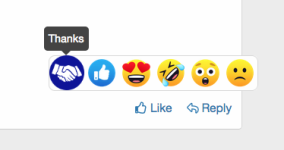
I ended up with a handshake instead of a thank you.....
Cheers, Andy
 
Did it slip a cog on it's way to me ?
I ended up with a handshake instead of a thank you.....
Cheers, Andy

if you hover over it - it says thanks!

out of interest, what image would you think represented thank you better?
we basically can allocate an image / a word / a point value (which increments your reaction score)

I was thinking of the very British, shake of the hand and a slightly raised eyebrow to acknowledge the other person - not sure we want more than that?! :D
 
if you hover over it - it says thanks!

out of interest, what image would you think represented thank you better?
we basically can allocate an image / a word / a point value (which increments your reaction score)

I was thinking of the very British, shake of the hand and a slightly raised eyebrow to acknowledge the other person - not sure we want more than that?! :D
Ah, righto, my portable devices lack the hover option ;)

Yes, interesting interpretation of this as it wasn't obvious to me:unsure:

Must admit the aforementioned words Thank You was always the one I'd opt for.

Cheers, Andy
 
Ah, righto, my portable devices lack the hover option ;)

Yes, interesting interpretation of this as it wasn't obvious to me:unsure:

Must admit the aforementioned words Thank You was always the one I'd opt for.

Cheers, Andy
understood! if you can't see the hover over word anyway, then we would need to think what graphic means the same - so I chose a pair of hands shaking... hopefully that will embed in and people will recognise it!
 
The ignore facility. Is it a bug or could it be my system. Win 10 / Chrome browser

I've found that putting a member on ignore then hides not only posts made by him but any thread he started in it's entirity which clearly isn't desirable as other members contributing posts can be interesting. This didn't happen to me with the old software. Clearing cache etc. made no difference.
Example: Measure twice thread disappeared immediately following putting him on ignore though I could still get it via my content. The iphone thread never appeared at all until he was taken off ignore.
Any ideas?
 
The ignore facility. Is it a bug or could it be my system. Win 10 / Chrome browser

I've found that putting a member on ignore then hides not only posts made by him but any thread he started in it's entirity which clearly isn't desirable as other members contributing posts can be interesting. This didn't happen to me with the old software. Clearing cache etc. made no difference.
Example: Measure twice thread disappeared immediately following putting him on ignore though I could still get it via my content. The iphone thread never appeared at all until he was taken off ignore.
Any ideas?
I will have a look
 
So simple answer is no.

That's the way the "ignore" function in Xenforo works. If you decide to ignore a specific person, you don't then see any of their content in a thread, or any quote from their content posted by somebody else, and any thread started by them does not appear in the forum listing (although you can see individual posts not from the ignored person listed in other ways).

So it is possible to see other posts eg through the search function or if someone links to them but you won’t see the thread in the forums as you have effectively told xenforo to ignore anything from that person which includes threads they start…

From what I have read, the logic is that if you are sufficiently not interested in someone else’s posts to put them in ignore then you won’t be interested in threads they start… if you have sufficient interest in content on threads they start then that means you shouldn’t be blocking them but instead perhaps just skipping over their posts…
 
So simple answer is no.

That's the way the "ignore" function in Xenforo works. If you decide to ignore a specific person, you don't then see any of their content in a thread, or any quote from their content posted by somebody else, and any thread started by them does not appear in the forum listing (although you can see individual posts not from the ignored person listed in other ways).

So it is possible to see other posts eg through the search function or if someone links to them but you won’t see the thread in the forums as you have effectively told xenforo to ignore anything from that person which includes threads they start…

From what I have read, the logic is that if you are sufficiently not interested in someone else’s posts to put them in ignore then you won’t be interested in threads they start… if you have sufficient interest in content on threads they start then that means you shouldn’t be blocking them but instead perhaps just skipping over their posts…
Thanks for checking Alisdair understood, I'll find a way of working with that now I know it isn't my system.

Their logic outlined in your last sentence is flawed as shown in the iphone thread for example. Nothing wrong with the subject or other's answers and I replied to Mike's post. As I've said previously when you block someone very prolific it really makes some of the threads nonsensical.
 
Thanks for checking Alisdair understood, I'll find a way of working with that now I know it isn't my system.

Their logic outlined in your last sentence is flawed as shown in the iphone thread for example. Nothing wrong with the subject or other's answers and I replied to Mike's post. As I've said previously when you block someone very prolific it really makes some of the threads nonsensical.
Unfortunately, that is one of the quirks with XenForo that didn't exist with vBulletin, or likely phpBB. When a few of the good vBulletin developers left to start XenForo, they had to make significant changes in the appearance and function of the software in order to avoid a lawsuit with Jelsoft (the former owner of vBulletin). One of the changes was how the ignore function works. In vBulletin, ignoring a member only applied to specific posts the member created. The content of others in threads created by the ignored member could still be read. The ignore function was not complete, because if another member quoted an ignored member, the quote would be visible. In XenForo, all content by an ignored member regardless of where it is will be hidden. An ignored member can send a private conversation to you, but you will never receive it and the ignored member will not know.

Some of the other differences between vBulletin (vB) and XenForo (XF) are in the terminology. For example, threads in vB are conversations in XF. Posts in vB are messages in XF. Private messages in vB are conversations in XF. Forums in vB are nodes in XF. However, we still call the content in XF by the terms we know, so if you discuss threads, posts, forums, PMs, and so on, with any XF developer, they won't be upset. Just don't mention the war. I mentioned it once, but I think I got away with it.
 
This ^^ nearly led to fisticuffs in another forum I administered for a while but did not set up. The ignore function is useful where people don't like each other, but in this case the guy who set up the forum in XF that we used (an earlier version) was an IT pro and he thought it was a good idea that people were notified when other participants toggled them on as being ignored. Perhaps that functionality was native in vB?
 
Adrian, my last deep dive into vB v3.x was about seven years ago, but I don't recall any member notification about being put on another member's ignored list. There is no notification in XF, and with the native code, Admins cannot see who is being ignored. However, there is a paid add-on that can be installed in XF to allow Admins to see who is being ignored by whom. Some XF websites have this add-on to identify problem members and then take the appropriate action.
 
Thanks Mike. My recollection was that admins could definitely always see it but also the person(s) being ignored were notified by PM that they were being ignored by member x. On an internet only forum it would not matter but this was a club that met quite frequently in person so things got up close and personal sometimes. The IT guy was also club chairperson for ages, so maybe he just did that himself, but I know he also added code to XF and was an expert on the functionality. Oddly enough he was ex military as well and an absolutely superb rider. I'm no longer involved with running the forum thankfully :rolleyes:
 
Alasdair, Mike, Zenforo savvy peeps: How does one edit one's posts? I spotted a mistake and wanted to quickly correct...no way in! I was sitting down at the time, so that has probably diminished my intelligence..😟

Edit!! And, just like that, the edit button has re-materialised, for THIS post, but I cannot find it for the Mouseman Thread post I made.
 
Alasdair, Mike, Zenforo savvy peeps: How does one edit one's posts? I spotted a mistake and wanted to quickly correct...no way in! I was sitting down at the time, so that has probably diminished my intelligence..😟
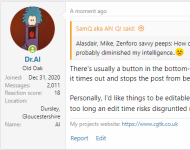
There's usually a button in the bottom-left next to "Report". However, I think it times-out. I think it's a XenForo configuration thing to set how long before it times out and stops the post from being editable.

Personally, I'd like things to be editable for longer (I sometimes re-read my posts from the day before and spot typos!), but I also understand that having too long an edit time risks disgruntled members going back and deleting old content. 🤷‍♂️

Edit: I used the Edit function to add this screenshot:

1712918675786.png
 
Thanks Dr. B., that makes sense. I agree; I'm also a typo-hunter. Alasdair, may we ask please if it is possible to re-configure the 'time-out' Al suspects is operating? I'd propose 48 hours instead of whatever interval it presently is?
 
The editing time tends to be a point of contention on nearly every discussion board. However, as Al wrote above, it only takes one disgruntled member to embark on a slash and burn campaign to remove relevant text and disrupt the conversations. Anyone who has administered or moderated discussion boards has likely experienced this.

On one of the discussion boards I owned, a member posted acerbic comments and insults directed at specific members. He would leave the post visible for what he thought was long enough for the intended victim to read it, remove the comments, and then deny any wrongdoing. What he didn't realize was all edits leave an audit trail clearly visible to the staff and we could see the before and after text. After a warning, followed by a 30-day suspension, he continued his activities and I permanently banned him. He had a unique username, which became "Guest001" and any occurrence of his username in the forums became "Guest001".
 
Some good answers above - forum is currently configured for a timeout of the edit function after 10 minutes...

The reason is as mentioned - most forums have people who join whose pleasure is disruption or provoking argument and it does poison the feel of the forum. I think we are lucky on here in terms of the quality of people, however that doesn't mean that will be the same for always - and the new software seems to have lead to an influx of new members...

I will chat with the rest of the team for their thoughts, however I think the sweet spot balance is long enough after posting for the person who has posted to read through their post in a leisurely fashion and edit if they find typos... but no longer or it opens up the issues mentioned above - and as with Mike I have had similar issues on several of the forums I own / manage... elsewhere we have found the best balance to be 10 minutes, hence the setting here...

To be honest, while we are all rightly proud of presenting well and not putting in typos, the occasional typos are not a problem and less of an issue than disruptive members...

It is also worth noting that the minute you are quoted by anyone you might be able to edit the original post, but it doesn't edit the quote...
 
Thanks Dr. B., that makes sense. I agree; I'm also a typo-hunter. Alasdair, may we ask please if it is possible to re-configure the 'time-out' Al suspects is operating? I'd propose 48 hours instead of whatever interval it presently is?
We'll think about that one but Alasdair and I agreed on the timeout and we are happy with it. Appreciated it doesn't cater for typos, but there's always going to be a compromise.

We'll have a look, but no promises.

EDIT : Alasdair's and my posts crossed.
 
I'm pretty sure that on PHP BB this forum was running quite happily with no time limit on editing your own posts.

One positive aspect of this freedom was that anyone updating a very long thread could repeatedly edit the title to reflect the current state of the project. I've done this on some of my slow wips and I know Mike G does it too.

I've also used it to update old threads where externally hosted photos were no longer available.
 
Must admit that for WIPS it is super helpful to be able to edit the original title so that we can see where a project has got to. It lets members know that another stage has been reached. I'm terrible with typos. This is because I use the mac dictate function or type blind (touch type) quickly when I have a minute, and sometimes don't realise I've made an error until someone replies to the thread and I go back to my post. But I also share the view that typos are not really a big deal as people usually understand what was meant. I would think that 90% of the posts are made by just 20 or 30 people so not that many fingers in the pie currently.
 
Yeah like I say, we'll have a look at it, it may be that we can allow title edit but not posts. We'll do some digging. It's very similar but also very different in the back end to phpBB so just takes a minute to find or create what we need.
 
I guess as a mod here and on the PHP site I have got used to editing my own posts frequently when I spot typos . Auto correct, spell checker, my own ineptitude and using a tablet all contribute to errors in my written word. I do not recall user edits on the old software causing as any issues.
 
Thanks Mike, Alasdair, Trim and Andy's P and T. I can more fully appreciate the dilema now; I will just have to be more vigilant over mistyping and phrasing.

The concept of modifying a title to reflect W.I.P. stages is a good one though.

S.
 
I've already managed to change part of my WIP title for my last post on it. I din't find it a problem. I did it like I used to on the old software.
 
I've already managed to change part of my WIP title for my last post on it. I din't find it a problem. I did it like I used to on the old software.
That is possibly because I am playing with permissions and current there are edit permissions available in that forum which are not available elsewhere! :D
 
Right, as a part of tweaking the features, there is a new forum called Draft Build Projects - if you pootle off in there, you will see a top notice saying:

This forum is for you to build draft threads on projects you are working on - there is no edit time limit and you can only see your own thread, so it is hidden until you are ready. When you want it to go live, report the thread with that request and a moderator will move it into a live forum for you.

And that is pretty much it :) - no edit restrictions - think of it as a more sophisticated area for drafting a thread / post - once you are ready a mod can move it into the live build area...

the staff team can see what is going on in there - everyone else can only see their own threads...
so please just use for multi-post build threads where you want to set up a number of posts and photos and text etc.
Anyone found using it to draft their manifesto to take over will have the thread deleted :D
 
Thanks again Alasdair, that will also be very useful as a sandbox to try out new features such as the improved picture posting without cluttering up the forum.
 
Thanks again Alasdair, that will also be very useful as a sandbox to try out new features such as the improved picture posting without cluttering up the forum.
Indeed - and you have the ability to delete your own thread there, so if you finish and don't need it do delete it - it does a soft delete, but mods will see soft-deleted threads and hard delete them occasionally to tidy up...
 
Back
Top