

-
Hi all and welcome to TheWoodHaven2 brought into the 21st Century, kicking and screaming! We all have Alasdair to thank for the vast bulk of the heavy lifting to get us here, no more so than me because he's taken away a huge burden of responsibility from my shoulders and brought us to this new shiny home, with all your previous content (hopefully) still intact! Please peruse and feed back. There is still plenty to do, like changing the colour scheme, adding the banner graphic, tweaking the odd setting here and there so I have added a new thread in the 'Technical Issues, Bugs and Feature Requests' forum for you to add any issues you find, any missing settings or just anything you'd like to see added/removed from the feature set that Xenforo offers. We will get to everything over the coming weeks so please be patient, but add anything at all to the thread I mention above and we promise to get to them over the next few days/weeks/months. In the meantime, please enjoy!
You are using an out of date browser. It may not display this or other websites correctly.
You should upgrade or use an alternative browser.
You should upgrade or use an alternative browser.
Post a photo of the last thing you made...
- Thread starter TrimTheKing
- Start date
duke
Old Oak
Very attractive spokeshave Pete. Had a quick view before your images went blank.
Pete Maddex
Old Oak
Mmmm I did have problems with the second image going blank when I previewed it but it seemed ok when I posted it, anyone else having the same problem?
Pete
Pete

Showing up fine here. Lovely work, as ever!Mmmm I did have problems with the second image going blank when I previewed it but it seemed ok when I posted it, anyone else having the same problem?
Pete
duke
Old Oak
Ok with images now.
fiveeyes
Nordic Pine
Nice...how is this adjusted?
Pete Maddex
Old Oak
Next to each brass knobs there is a hole and in this hole lives a grub screw, you slacken the brass knob and turn the grub screw for more or less of a cut.Nice...how is this adjusted?
The usual method is a screw underneath each side of the blade, but then you need to remove the blade to adjust it.
Pete
Cabinetman
Sequoia
- Joined
- Oct 11, 2020
- Messages
- 5,830
- Reaction score
- 1,470
- Location
- Lincolnshire Wolds + Massachusetts
- Name
- Ian
That’s a lovely looking tool, neat adjustment too.

Peri
Sapling

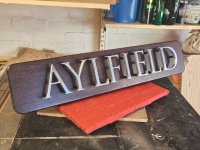

Woodbloke
Sequoia
SWIMBO has bought more antique Japanese books on netsuke so this set (six in all, 200 years old) required an archive box to store them. Archive board, bookbinding tools and a vast range of covering papers can be purchased from Shepherd's Bookbinders, just behind Victoria Station in Londres. This box has just been finished:
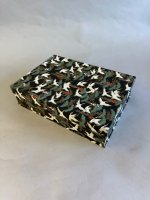
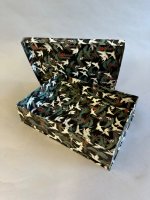
...made in very thin, 1mm thick archive board and covered in hand made Japanese printed washi paper.
There's dozens of 'how to' videos on UToob, but this guy in Australia I think is particularly good and he's got more videos online than Rob Cosman. One of things that's particularly useful for this sort of malarky is the two types of paste:
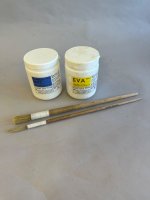
...sold by Shepherds, a slow (5mins) one for positioning papers and a fast one which will sets card and paper almost instantly. If you have a few minutes to spare, the video clip is well worth a view as there's a lot of precision stuff needed to make these sorts of items - Rob
...made in very thin, 1mm thick archive board and covered in hand made Japanese printed washi paper.
There's dozens of 'how to' videos on UToob, but this guy in Australia I think is particularly good and he's got more videos online than Rob Cosman. One of things that's particularly useful for this sort of malarky is the two types of paste:
...sold by Shepherds, a slow (5mins) one for positioning papers and a fast one which will sets card and paper almost instantly. If you have a few minutes to spare, the video clip is well worth a view as there's a lot of precision stuff needed to make these sorts of items - Rob

Doug
Old Oak
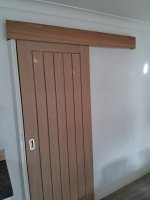
A few recent bits,
Got the oak pelmet fitted.
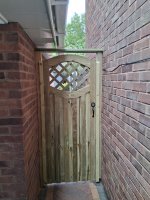
Fitted a gate, didn’t make the gate as it was so inexpensive made to measure it wasn’t viable.
Got asked for a rustic Oak mantle this was it after some distressing, customer is going to look at it before I apply any finish.
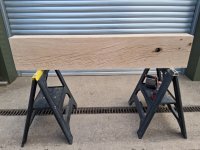
After some though I decided the easiest way to install it was on a French cleat so this is it having a large pocket cnc’ed into the back.
Hopefully the cleat will allow for any shrinkage as the beam is 1.5m long & 270 x 120mm so not completely dry.
Got the oak pelmet fitted.
Fitted a gate, didn’t make the gate as it was so inexpensive made to measure it wasn’t viable.
Got asked for a rustic Oak mantle this was it after some distressing, customer is going to look at it before I apply any finish.
After some though I decided the easiest way to install it was on a French cleat so this is it having a large pocket cnc’ed into the back.
Hopefully the cleat will allow for any shrinkage as the beam is 1.5m long & 270 x 120mm so not completely dry.
Woodbloke
Sequoia
More book stuff for SWIMBO:
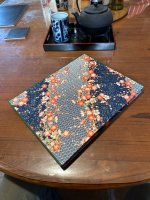
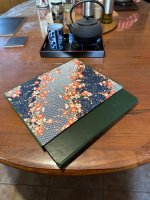
A slip case for another netsuke book; hand printed Japanese washi paper covers. Trickier than normal as the boards were initially bent like a banana; flat works a bit better - Rob
A slip case for another netsuke book; hand printed Japanese washi paper covers. Trickier than normal as the boards were initially bent like a banana; flat works a bit better - Rob
duke
Old Oak
Nice looking gate Doug.More book stuff for SWIMBO:
View attachment 58661
View attachment 58662
A slip case for another netsuke book; hand printed Japanese washi paper covers. Trickier than normal as the boards were initially bent like a banana; flat works a bit better - Rob
Woodbloke
Sequoia
The first part of the 'V' door has been done on the JK 'V' Door Cabinet in English Walnut. So far, so good but I donned the thinking cap and realised that a raised jig shown below to glue each side at a time:

...would make life a lot easier and ensure the door was out of 'wind'. The outer sections were glued on today which are 2mm higher that the 'V':
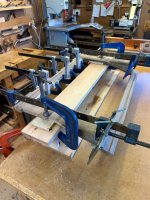
...and once cleaned up:

...the door is coming along nicely. The next job is the centre glazing bar which might prove 'tricky'. Walnut is ever so slightly easier to use than Bubinga. I hate Bubinga! - Rob
...would make life a lot easier and ensure the door was out of 'wind'. The outer sections were glued on today which are 2mm higher that the 'V':
...and once cleaned up:
...the door is coming along nicely. The next job is the centre glazing bar which might prove 'tricky'. Walnut is ever so slightly easier to use than Bubinga. I hate Bubinga! - Rob
Last edited:
Woodbloke
Sequoia
Keeps the 'little grey cells' (or what's left of themYou do like a challenge, don't you!
 ) ticking over Andy. Has the little wee envelope arrived in Bristol? - Rob
Not yet!Has the little wee envelope arrived in Bristol? - Rob
 - Rob
- Rob
Dr.Al
Old Oak
Some things...
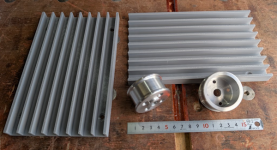
The plastic bits were made by the 3D-printer, the 50 mm diameter aluminium bits were turned from 50.8 mm (2") bar by me (and the steel rule was made by Shinwa )
)
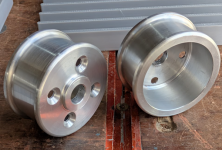
I don't really know what any of these are - they're for my father. He's in the process of making a weaving loom and asked me to make some bits for him (I'd previously 3D-printed a whole load of pulleys for the same loom. I think the aluminium bits are for some sort of brake (presumably with some string wound around the outside a few times) but that's about the limit of my knowledge on the subject.
The plastic bits were made by the 3D-printer, the 50 mm diameter aluminium bits were turned from 50.8 mm (2") bar by me (and the steel rule was made by Shinwa
)I don't really know what any of these are - they're for my father. He's in the process of making a weaving loom and asked me to make some bits for him (I'd previously 3D-printed a whole load of pulleys for the same loom. I think the aluminium bits are for some sort of brake (presumably with some string wound around the outside a few times) but that's about the limit of my knowledge on the subject.
Last edited:
duke
Old Oak
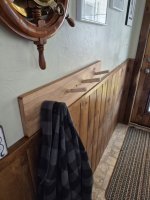
Family are arriving soon for Thanksgiving tomorrow , so thought I would make a quick coat rack. Maybe they won't clutter up the bench. Made from Cherry and pegs are Maple. No finish on it yet.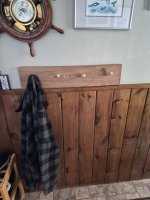
Cabinetman
Sequoia
- Joined
- Oct 11, 2020
- Messages
- 5,830
- Reaction score
- 1,470
- Location
- Lincolnshire Wolds + Massachusetts
- Name
- Ian
Nicely rustic! Interesting clock set in a porthole? In a wheel. Very nautical.
duke
Old Oak
No clock, wow the pic sure makes it look like a clock. Just a barometer, I brought this home from Southampton in 1992.
Very rustic, whipped this out in 45 mins. Rustic sounds better than not very nice workmanship.
Very rustic, whipped this out in 45 mins. Rustic sounds better than not very nice workmanship.
Doug
Old Oak
What spare time I’ve had recently has been dedicated to sorting out the long term storage of timber I’ve amassed over the years, I posted in the what have I fixed thread the welding up of a new storage rack well this is it fixed in place.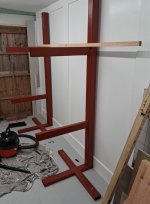
All the air dried timber I have has been stored in two lorry bodies at a mates, over the years I’ve kept adding to the collection but time has arrived to straighten up the planks into square edged boards to make for easier storage at home.
First up for the removal of its live edges was quite a bit of Elm seen here stood up at the back of the workshop.
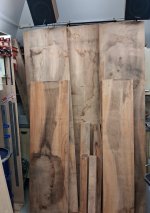
It was then moved to the bottom of the rack along with some maple, this is the newest air dried timber I have at around 6 years old so not really needing sticking
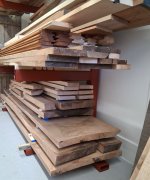
Above that is some sweet Chestnut, it was at this point I realised the gap between the 2 arms was to big as I don’t mind moving a bit of timber getting to the piece I want but I didn’t want to move a 3’ pile so some wedges were made to fit in the ends of the arms.

This allowed for mid supports to be fitted to 2 timber front legs fixed to the wedges, this is as far as I’ve got today.
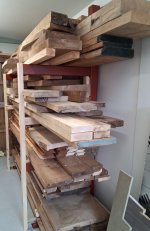
I’ve still got some tidying up of the timber to do & shuffle it around a bit more as this is less than one lorry bodies worth & Ive another lorry body to empty.

All the air dried timber I have has been stored in two lorry bodies at a mates, over the years I’ve kept adding to the collection but time has arrived to straighten up the planks into square edged boards to make for easier storage at home.
First up for the removal of its live edges was quite a bit of Elm seen here stood up at the back of the workshop.
It was then moved to the bottom of the rack along with some maple, this is the newest air dried timber I have at around 6 years old so not really needing sticking
Above that is some sweet Chestnut, it was at this point I realised the gap between the 2 arms was to big as I don’t mind moving a bit of timber getting to the piece I want but I didn’t want to move a 3’ pile so some wedges were made to fit in the ends of the arms.
This allowed for mid supports to be fitted to 2 timber front legs fixed to the wedges, this is as far as I’ve got today.
I’ve still got some tidying up of the timber to do & shuffle it around a bit more as this is less than one lorry bodies worth & Ive another lorry body to empty.
SamQ aka Ah! Q!
Old Oak
Seconded!!Wow, that's a serious stash!
duke
Old Oak
So, you are in need of another rack Doug?
Cabinetman
Sequoia
- Joined
- Oct 11, 2020
- Messages
- 5,830
- Reaction score
- 1,470
- Location
- Lincolnshire Wolds + Massachusetts
- Name
- Ian
Good work around Doug, but as I’m sure you know you will be needing a third and fourth rack the way you’re going lol.
Edit, I had an open fronted wooden box fastened to the wall and anything shorter than 400 mm went into that, this freed up space on my racks and almost as important I knew which pile to look in for Wood of a certain length.
Ian
Edit, I had an open fronted wooden box fastened to the wall and anything shorter than 400 mm went into that, this freed up space on my racks and almost as important I knew which pile to look in for Wood of a certain length.
Ian
Last edited:
Doug
Old Oak
I’ve been collecting a while, I used to write the date on timber as I got it Andy & the earliest date I found as I was clearing out was 2007 thought this was my second lorry body so the next lot will be older, my wife always says I have a problem, but to me it seems a nice problem to haveWow, that's a serious stash!
Doug
Old Oak
I’m hoping not Scott, the Chestnut is for gates that I hope to make this winter along with making a start on a bedroom suite from a lot of the Ash that’s on the rack so by spring I’m hoping to have freed up a fair bit of space & then I’ll bring another load over.So, you are in need of another rack Doug?
MattS
Nordic Pine
Wow quite a stash! Do you use it on client projects though, probably not so big if it’s stock for a business!
Doug
Old Oak
Shorter pieces tend to end up on the shelves in the workshop Ian, there are some chunky short pieces of Ash on the rack that need moving elsewhere, I used to turn sofa legs from them for a furniture maker who’s pieces got shipped to America but that work dried up when Trump took office.Good work around Doug, but as I’m sure you know you will be needing a third and fourth rack the way you’re going lol.
Edit, I had an open fronted wooden box fastened to the wall and anything shorter than 400 mm went into that, this freed up space on my racks and almost as important I knew which pile to look in for Wood of a certain length.
Ian
Woodbloke
Sequoia
Thirdeded!! - RobSeconded!!
Doug
Old Oak
No most of this has always been intended for my personal use, almost all of timber I use for work is kiln dried from the timber merchant.Wow quite a stash! Do you use it on client projects though, probably not so big if it’s stock for a business!
Doug
Old Oak
Carrying on with the wood store I wanted a bench in there on which I could break down timber & also do jobs I don’t want to do on the shop bench.
Around 5 years ago I cut out this MFT top with a mate on his CNC.
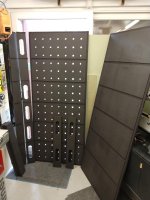
The plans I had for it changed so it’s been stored ever since so Tuesday I began assembling it starting by gluing the torsion box ribs together & also to the top.

Then gluing the bottom to the top with cauls & just about every small clamp I own.
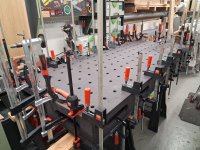
I’d acrylic lacquered the internal bits prior to gluing it together & this morning the exterior was given a coat, once dry it was moved into position.

I want to keep this so it can be broken down but intend to make some wooden trestles that will have a shelf between them to give me more storage for timber.
The sheets of insulation at the back of the photo will eventually be incorporated in the two doors I need to build for the wood store at the moment it’s an old cut down fence panel & gate.
Around 5 years ago I cut out this MFT top with a mate on his CNC.
The plans I had for it changed so it’s been stored ever since so Tuesday I began assembling it starting by gluing the torsion box ribs together & also to the top.
Then gluing the bottom to the top with cauls & just about every small clamp I own.
I’d acrylic lacquered the internal bits prior to gluing it together & this morning the exterior was given a coat, once dry it was moved into position.
I want to keep this so it can be broken down but intend to make some wooden trestles that will have a shelf between them to give me more storage for timber.
The sheets of insulation at the back of the photo will eventually be incorporated in the two doors I need to build for the wood store at the moment it’s an old cut down fence panel & gate.
duke
Old Oak
Looks to be a very usefull multipurpose bench Doug.
Doug
Old Oak
I think so Scott, I’m certainly pleased with how its turned out
MattS
Nordic Pine
I know it’s far from real timber but I do like coloured MDF. When finished there’s often a bit of colour variation with is pleasing and almost has the appearance of stone.
Dr.Al
Old Oak
I'm not sure how many people on here do much with 3D CAD models as STEP files, but...
Today I (with an enormous amount of assistance from A.I.) finished making a web-browser based STEP (and IGES) Viewer:
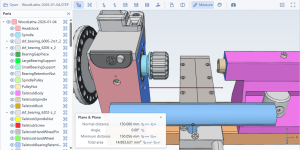
There are quite a few web-based STEP viewers out there, but I couldn't find one that did all the things I wanted, in particular:
Today I (with an enormous amount of assistance from A.I.) finished making a web-browser based STEP (and IGES) Viewer:
There are quite a few web-based STEP viewers out there, but I couldn't find one that did all the things I wanted, in particular:
- Easy measurements using real features: e.g. select two planar faces as in the screenshot above (highlighted in blue) and it'll tell you the normal distance (indicated by the red line in the screenshot above). Select two faces (or edges) that are not parallel and it'll tell you the angle between them. In the wood lathe example above, if I select the morse taper and the bed, it tells me the centre height (the distance from taper cone axis to the plane formed by the bed). There are too many examples to list them all here.
- Easy measurement of volume / mass - select a part in the list on the left (or the top of the tree, which selects everything) and it'll tell you the volume and give a drop-down menu to choose material and hence give mass.
- 3Dconnexion space mouse support (after you click a button at the bottom of the page and agree to anything the browser asks) - move the model around in the web browser with the space mouse.
- Turn individual parts on and off (either from the parts list on the left or right-click on a part and press hide).
- View normal to any planar face (right click or select the face in measurement mode and press the button on the toolbar).
- Cross sections, including selecting two parallel planar faces and doing a cross section through the plane that is halfway in between them. After making a cross-section, you can pick an inner edge/face/vertex, then turn the cross-section off and shift-select another one - you'll then get the measurement between the internal and external points.
- Colours are loaded from the STEP file if it has them; otherwise each part is given a different colour to make it easy to distinguish

Windows
Old Oak
That’s very useful. Measurement and auto colouring is very handy. What A.I. helped you with this?I'm not sure how many people on here do much with 3D CAD models as STEP files, but...
Today I (with an enormous amount of assistance from A.I.) finished making a web-browser based STEP (and IGES) Viewer:
View attachment 59603
There are quite a few web-based STEP viewers out there, but I couldn't find one that did all the things I wanted, in particular:
Feedback welcome from anyone who might find this useful.
- Easy measurements using real features: e.g. select two planar faces as in the screenshot above (highlighted in blue) and it'll tell you the normal distance (indicated by the red line in the screenshot above). Select two faces (or edges) that are not parallel and it'll tell you the angle between them. In the wood lathe example above, if I select the morse taper and the bed, it tells me the centre height (the distance from taper cone axis to the plane formed by the bed). There are too many examples to list them all here.
- Easy measurement of volume / mass - select a part in the list on the left (or the top of the tree, which selects everything) and it'll tell you the volume and give a drop-down menu to choose material and hence give mass.
- 3Dconnexion space mouse support (after you click a button at the bottom of the page and agree to anything the browser asks) - move the model around in the web browser with the space mouse.
- Turn individual parts on and off (either from the parts list on the left or right-click on a part and press hide).
- View normal to any planar face (right click or select the face in measurement mode and press the button on the toolbar).
- Cross sections, including selecting two parallel planar faces and doing a cross section through the plane that is halfway in between them. After making a cross-section, you can pick an inner edge/face/vertex, then turn the cross-section off and shift-select another one - you'll then get the measurement between the internal and external points.
- Colours are loaded from the STEP file if it has them; otherwise each part is given a different colour to make it easy to distinguish