Will be two finger push then, or go into settings and check the mouse settings and it will tell you what your equiv of a right click is set to.You must have a different 'pooter and OS to me Andy 'cos my wireless Apple mice doesn't have a right click - Rob

-
Hi all and welcome to TheWoodHaven2 brought into the 21st Century, kicking and screaming! We all have Alasdair to thank for the vast bulk of the heavy lifting to get us here, no more so than me because he's taken away a huge burden of responsibility from my shoulders and brought us to this new shiny home, with all your previous content (hopefully) still intact! Please peruse and feed back. There is still plenty to do, like changing the colour scheme, adding the banner graphic, tweaking the odd setting here and there so I have added a new thread in the 'Technical Issues, Bugs and Feature Requests' forum for you to add any issues you find, any missing settings or just anything you'd like to see added/removed from the feature set that Xenforo offers. We will get to everything over the coming weeks so please be patient, but add anything at all to the thread I mention above and we promise to get to them over the next few days/weeks/months. In the meantime, please enjoy!
You are using an out of date browser. It may not display this or other websites correctly.
You should upgrade or use an alternative browser.
You should upgrade or use an alternative browser.
Apple Sequoia ‘trashgrade’
- Thread starter RogerS
- Start date

Info here might here help Rob
Right-click on Mac
On your Mac, Control-click the desktop, icons or files to open shortcut menus.
support.apple.com

Mike
Sapling
I'm using an Apple wireless mouse, and it most certainly does have a right click function. When I press on the upper right corner of the smooth surface, this becomes the right click.You must have a different 'pooter and OS to me Andy 'cos my wireless Apple mice doesn't have a right click - Rob
It's a configurable setting, you can change it in mouse settings to be different things so Rob's could be set to anything. Settings is where the answer will lie...

AJB Temple
Sequoia
- Joined
- Apr 15, 2019
- Messages
- 7,722
- Reaction score
- 1,201
Mouse???? Trackpad is surely better nowadays. Have not used a mouse for years.
Same, I bought the Magic Mouse with my Mac but used it for about 10 mins, then realised the trackpad was so much easier, and the mouse has been in its box ever since.

Dr.Al
Old Oak
Trackpad's fine for quick stuff if you have to use a laptop on your lap, but I wouldn't be without a (three-button) mouse for day-to-day stuff. A decent mouse is so much faster and more accurate than a trackpad. I've done some small bits of 3D-CAD with a trackpad and it was an awful experience.
No track pad on a mac mini, wired mouse never runs out of juice.Trackpad's fine for quick stuff if you have to use a laptop on your lap, but I wouldn't be without a (three-button) mouse for day-to-day stuff. A decent mouse is so much faster and more accurate than a trackpad. I've done some small bits of 3D-CAD with a trackpad and it was an awful experience.
My link earlier details where and how to configure wireless mouse.
Dr.Al
Old Oak
I prefer a wireless mouse, but I know what you mean about the juice. Mine runs on a single AA battery (and pops up a message on the screen when the battery is running low) so it's pretty easy to just swap it out. My desk has enough wires on without adding more for the mouse! I imagine for most people the cable wouldn't be that much of an issue though.No track pad on a mac mini, wired mouse never runs out of juice.
My link earlier details where and how to configure wireless mouse.


I really struggle with working with text on the iPad and so I reckon a Trackpas would be money down the drain for me.Mouse???? Trackpad is surely better nowadays. Have not used a mouse for years.
I like the wireless mouse and ditto the keyboard BUT I do have two wired 'Get-out-of-Jail-Free' mouse and keyboard.No track pad on a mac mini, wired mouse never runs out of juice.
My link earlier details where and how to configure wireless mouse.

Woodbloke
Sequoia
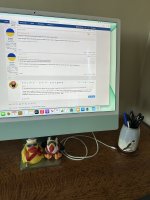
I detest wires n'cables, full stop. The only 'puter wire with a new iMac is the charging cable for the mouse and keyboard. Said cable will also charge up your iPhone and enable super quick transference of piccies to iPhoto. Apart from that the desk is clear apart from a pen pot and SWIMBO's squeaky duck as a well as a puffin wot sits under the screen - RobMy desk has enough wires on without adding more for the mouse! I imagine for most people the cable wouldn't be that much of an issue though.
Dr.Al
Old Oak
I detest wires n'cables, full stop.
Me too, but sadly it's quite difficult to get decent soldering irons, oscilloscope leads, bench power supplies and microcontroller programming headers that work without cables so they're a bit of an inevitability in my world. Not to mention the fact my desk has a laptop and a desktop PC as well as two big monitors (connected to both laptop and desktop) and two wired 3Dconnexion 3D-mouse (one wired to each computer). You can get wireless 3Dconnexion things but they're rather pricey.
The mouse and keyboard are wireless though (Logitech MX range that can connect to multiple computers so one keyboard and mouse for two computers).
I do strongly urge you to have a 'Get-out-of-Jail-Free' mouse and keyboard because it is not unknown for the Mac to fail to boot properly and not recognise either bluetooth variety. That £5 mouse comes in bloody handy then.I detest wires n'cables, full stop. The only 'puter wire with a new iMac is the charging cable for the mouse and keyboard. Said cable will also charge up your iPhone and enable super quick transference of piccies to iPhoto. Apart from that the desk is clear apart from a pen pot and SWIMBO's squeaky duck as a well as a puffin wot sits under the screen - Rob
View attachment 33324