• Hi all and welcome to TheWoodHaven2 brought into the 21st Century, kicking and screaming! We all have Alasdair to thank for the vast bulk of the heavy lifting to get us here, no more so than me because he's taken away a huge burden of responsibility from my shoulders and brought us to this new shiny home, with all your previous content (hopefully) still intact! Please peruse and feed back. There is still plenty to do, like changing the colour scheme, adding the banner graphic, tweaking the odd setting here and there so I have added a new thread in the 'Technical Issues, Bugs and Feature Requests' forum for you to add any issues you find, any missing settings or just anything you'd like to see added/removed from the feature set that Xenforo offers. We will get to everything over the coming weeks so please be patient, but add anything at all to the thread I mention above and we promise to get to them over the next few days/weeks/months. In the meantime, please enjoy!

Can't get at woodhaven from PC

Dr.Al

Old Oak
Joined
Dec 31, 2020
Messages
3,707
Reaction score
2,494
Location
Dursley, Gloucestershire
Name
Al
Any idea what's going on here? It's working on the mobile, but on Windows neither Vivaldi (top/behind) or Firefox (bottom/in front) are happy:
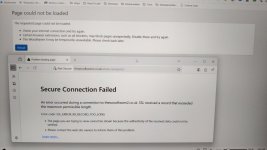
20250709_192107.jpg
 
I get that a lot. It's a pain.
Are you using a VPN? If so, try switching it off. Or set it to a UK server, Or tell it you are in Mauritnia. Anywahere, really.
But fiddling with that usually solves the problem.
Eventually.
S
 
I get that a lot. It's a pain.
Are you using a VPN? If so, try switching it off. Or set it to a UK server, Or tell it you are in Mauritnia. Anywahere, really.
But fiddling with that usually solves the problem.
Eventually.
S
I'll try a VPN in case that helps (away from the PC at the mo), but I wasn't using one when I tried it earlier.
 
You say your mobile works but not your PC. Can you set up your mobile as a wifi hotspot and connect via that with your PC.
If the connection works then your PC is fine and the problem is with the ISP for your normal PC connection,
probably an SSL certificate somewhere in the connection chain has expired.
 
You say your mobile works but not your PC. Can you set up your mobile as a wifi hotspot and connect via that with your PC.
If the connection works then your PC is fine and the problem is with the ISP for your normal PC connection,
probably an SSL certificate somewhere in the connection chain has expired.
Thanks Jim.

The mobile was on the same wifi network as the laptop. However, this morning I tried turning wifi off on the mobile (so it used 5G) & then turning the hotspot on & connecting the laptop.

Exactly the same result sadly: I still can't connect via the PC.

I've written & shared another post for the Mini-Moravian thread, but it would be a nightmare to try to share it via the mobile so I've only shared it on my website & a couple of other forums for now. Hopefully I'll manage to connect properly again soon but until then my posts on here will be text only!
 
Way beyond by pay grade I’m afraid. We use a number of platforms here across OSX, IOS and Windoze. I can’t replicate the problem and therefore doubt the issue is forum server related. Have you tried an engineer's reset of the PC and the router?
 
Googling 'ssl errors on one PC only' (is that correct?) Brings up wrong date or time on the PC as the usual cause and a bunch of other stuff that all seem unlikely.
No problem here either btw.
 
Time is right & I've tried rebooting everything. I also tried various more obscure things I found online like disabling "Experimental QUIC settings" (whatever that means) & clearing the SSL cache.

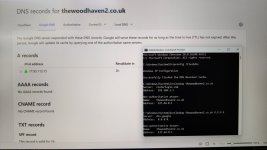
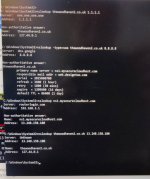
It looks like it might be a DNS issue, but I've no idea how to fix it. If I query the address of thewoodhaven2.co.uk it gives me a weird (127.44.0.1) result, even if I tell it to use google's DNS server (8.8.8.8) rather than the router's one. If I use an online DNS search via Google, it gives what I assume is the right address (77.95.113.15).

Website in the background, command prompt with local DNS queries in the foreground:

20250710_100533.jpg

It's really weird that only thewoodhaven2 seems to be affected.

Even if I use the "authoritive domain server" for thewoodhaven2 (which seems to be ns1.mysecurecloudhost.com), I still get the 127 address.

20250710_101328.jpg
 
It's obviously something Windows-y.

I've tried three computers all on the same network now:
  • Android phone (tested with browser): works fine (wifi or 5G).
  • Linux server (tested with "host" DNS lookup command): works fine.
  • Windows PC (tested with browser & nslookup DNS lookup command): doesn't work.
Argh!
 
I think I've worked out what's happening, but not why.

I've got Malwarebytes on my Windows PC (because I don't trust Windows defender or whatever the built-in thing is called).

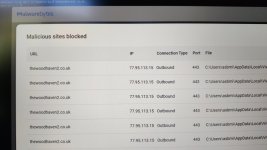
It seems Malwarebytes has decided that thewoodhaven2 is a malicious site & is blocking it (by intercepting the DNS requests).

20250710_115523.jpg

I don't know why they think all this talk of woodwork is malicious. Maybe there were one too many sharpening discussions!

I can't see a way to have a local whitelist, so I guess I'll have to raise it with Malwarebytes & hope they allow it again. I don't really want to disable the protection completely.
 
Since Kaspersky became a no no I've been using Bitdefender. so far so good. It has blocked the odd link but none that I wanted to use. I paid £20 for 5 devices for a year last time. Currently £15 on Amazon prime day.
 
Since Kaspersky became a no no I've been using Bitdefender. so far so good. It has blocked the odd link but none that I wanted to use. I paid £20 for 5 devices for a year last time. Currently £15 on Amazon prime day.
Thanks, but I'm not really sure that ditching a system I've already paid for & has (up until now) worked well is really the ideal solution.

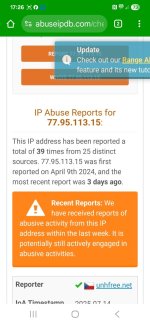
Apparently the IP address of the woodhaven forum has been reported as being a source of brute force attacks and that's why it's blocked. I kinda feel that Malwarebytes is doing the right thing here.

One for the mods: is the IP address shared with other services? If so, it could be one of them. If not, it might imply hacking?

35 reports of abuse from 23 different sources apparently (mostly in the last few days):


"Confidence of Abuse is 100%"
 
It's shared hosting with several websites on the same IP address. Without any further information than what's in that link, the most likely answer is that someone else using the same host has an out of date WordPress install which has been compromised, and the attacker is using it to repeat the same exploit against other people.
 
I guess there's a good chance that other web protection tools will gradually catch up with Malwarebytes & start blocking it as well (assuming the owner of the compromised site doesn't sort it out soon).
 
I don't know if it's the egotistical fascist, but I've had trouble ("droid/'dose) logging on for 48 hours and this morning, I note no.new posts....'cept this one. Odd.
 
The IP is our server so only my clients
There was a DDOS attack about 2 weeks ago - now fixed and the blacklist was cleared at that point…

If there are still issues then I will look on my return - flying back from Greece today where I have been on a boat in the middle of nowhere for the last week…

Malwarebytes does have the ability to whitelist…
 
Interesting!
I've experienced exactly the same issue a few times though intermittently so I just put it down to the quirks of windows 10. It's never caused me enough issues for me to look for a solution but I'll do that next time it happens.
Not only WW2 though, it's happened on other sites as well.
 
Thanks Alasdair

The IP is our server so only my clients
There was a DDOS attack about 2 weeks ago - now fixed and the blacklist was cleared at that point…

It looks like the last report on "abuseipdb" was 3 days ago (about 2pm on 14/7/2025)

If there are still issues then I will look on my return - flying back from Greece today where I have been on a boat in the middle of nowhere for the last week…

Sounds lovely!

Malwarebytes does have the ability to whitelist…
I've added it to the whitelist for now, but it's not something I particularly like doing, so I've currently got a regular reminder to check whether the blacklist has been cleared as I'd much rather not have exceptions.
 
Seems like abuseipdb.com is wide open to manipulation by mischief makers or hackers.
 
We are keeping an eye on this but it does look as though there is something strange going on - there is no actual evidence of any abuse from our server - either email or bot activity - so where the reports are coming from is currently a mystery - but the techies are working on it…

It is worth noting that a high number of websites will be on ip addresses that are blacklisted somewhere - a part of being able to use them is also setting up the viewing machine to take a sensible path through these types of reports and know when to block / not block a website - and that should be based on critical things such as SSL certificates being accurate - not a shared IP with spurious blacklisting which will 99.99% of the time have nothing to do with and no impact on the website concerned…
 
Back
Top