• Hi all and welcome to TheWoodHaven2 brought into the 21st Century, kicking and screaming! We all have Alasdair to thank for the vast bulk of the heavy lifting to get us here, no more so than me because he's taken away a huge burden of responsibility from my shoulders and brought us to this new shiny home, with all your previous content (hopefully) still intact! Please peruse and feed back. There is still plenty to do, like changing the colour scheme, adding the banner graphic, tweaking the odd setting here and there so I have added a new thread in the 'Technical Issues, Bugs and Feature Requests' forum for you to add any issues you find, any missing settings or just anything you'd like to see added/removed from the feature set that Xenforo offers. We will get to everything over the coming weeks so please be patient, but add anything at all to the thread I mention above and we promise to get to them over the next few days/weeks/months. In the meantime, please enjoy!

MS Outlook replacement

Phil

Old Oak
Joined
Jul 23, 2014
Messages
4,182
Reaction score
400
Location
Southern Africa 0054
Ok, here I go again!

I moved to MO-365 when I had to upgrade to W11 specifically for my Outlook mail.
I have found suitable Freeware to replace Excel, Powerpoint and Word – but not really intending to change.

BUT

Received an e-mail from Microsoft the other day stating that my annual subscription will increase from next annual renewal date by ZAR500.00 which is a 45% increase. (not sure if Trump related!)
Yes I know someone on the forum did warn me when I switched a couple of years this would happen. :censored:
However it was done from a convenience point of view.

Now looking for an e-mail app for my PC that must have IMAP & POP3 so that I can connect and download from my Gmail account and also the secondary Hotmail account. This is a must.

Does anyone here use a PC based e-mail system connected to an external e-mail account?

I have done a Google and there may be one or two options.

Obviously a Freeby would be ideal. :cool:
 
Thunderbird, proper open source freeware from the Mozilla foundation.
It will do everything you need. In my experience the only downside is that because it's so flexible, it can appear complicated, but you should be able to find documentation that matches your intended use.
 
There is a way to activate windows and office by running a command in windows powershell, it’s easy to google and it works, so I have been told.

😉

Pete
 
Yep, if the requirement is for IMAP and/or POP, then Thunderbird is the answer. There's really no reason to use anything else unless you're part of a full corporate setup.
 
I'm writing this at the breakfast table - would have to look up the details, but...

... There's one annyoying issue with Thunderbird (which I've used for years, incidentally), IF you need to connect to a Micro$oft Exchange server, it needs a paid-for plug-in to work correctly. A few years back, the documentation suggested that it just worked with the built-in functionality inside Thunderbird, but this isn't really true. I'll dig out the details if I get to my desk today. The add-on annual sub is about $10 USD - anoying but not a bank-breaker.

Thunderbird doesn't need extras for POP3 or IMAP, and does both well (POP3 is almost obsolete these days, because if the inherent security issues though). It will connect seamlessly (IMAP) to Gmail, and a raft of other suppliers. One big advantage is you can mirror an IMAP data structure locally, if you so choose, so that you have a local copy of everything (a feature of IMAP, not TB specifically).

TB has one issue, which shouldn't really be a problem for business email, which is that it's email client is a bit simple - if you use a lot of HTML markup in email messages (fonts and text formatting/decoration, lots of images), you might get unexpected although consistent results at the recipient end. Stick to simple formatting of emails (boldface, italics, bulleted lists, etc. and simple image placement wihout complex text wrapping) and all should be fine. Email wasn't designed to be a wordrocessor! And anyway, other email clients, such as Gmail in a web browser, have even more annoying traits, such as random changes of font size, only visible once sent!

Thunderbird does integrate nicely with ICAL-compliant diary/calendaring systems too. This means that diary invitations, to events/meetings, etc. can be automatically imported into your calendar, and if you use the one built into Thunderbird, that can be easily shared woith other people at your discretion. My wife and I share each other's calendars, for example, which is very helpful.

Thunderbird and the Open Office suite are both entirely free and unencumbered, even for business use. I haven't had a MS product on any of the machines I own for more than 20 years now. I don't really miss them, and I think Windows 11 is a shot to the big toe.
 
Thanks chaps for the input, very helpful. (y)(y)(y)

EtV that's a lot of useful information :cool:

What I will do during the week is download TB to my wife PC. She does not use Outlook and works directly in Gmail.
I will also look to see how can port my .PST files into FB, I would not like to loose the e-mails and history.
 
Eric makes some good points about Thunderbird. If you use it for business where you want a logo and maybe some text in a different font and colours, and perhaps some other artefacts, it is fairly unpredictable in what the recipient will see. In particular it will tend to alter the format and placement and in our case resized logos (much larger) unprompted. We realised it was not usable for us for these reasons. For simple domestic type use it is excellent.

As an aside, iCloud drives me insane. Apple have lost the plot really.
 
I presently use two flavours of Linux: xubuntu (looks like an older version of Windows), and Mint.

I'm probably migrating to all Mint, as it's more compatible with some things, e.g. TaxCalc (which is brilliant, BTW) running natively under Linux, and Sketchup 2015, running under the Wine Windows emulator.

I'd recommend Mint to anyone starting with Linux, too. xubuntu used to be great, but started to lose its edge a few years back, and Mint seems to have overtaken it in usability.
 
Eric makes some good points about Thunderbird. If you use it for business where you want a logo and maybe some text in a different font and colours, and perhaps some other artefacts, it is fairly unpredictable in what the recipient will see. In particular it will tend to alter the format and placement and in our case resized logos (much larger) unprompted. We realised it was not usable for us for these reasons. For simple domestic type use it is excellent.

As an aside, iCloud drives me insane. Apple have lost the plot really.

AJB private use, I only have my e-mail signature that would need changing. My contract work and any trading is on a Hotmail address, now called Outlook by MS, has always been fairly basic.
 
I presently use two flavours of Linux: xubuntu (looks like an older version of Windows), and Mint.

I'm probably migrating to all Mint, as it's more compatible with some things, e.g. TaxCalc (which is brilliant, BTW) running natively under Linux, and Sketchup 2015, running under the Wine Windows emulator.

I'd recommend Mint to anyone starting with Linux, too. xubuntu used to be great, but started to lose its edge a few years back, and Mint seems to have overtaken it in usability.

Eric, thanks very much.
That is territory never yet explored:eek:

One is never too old to learn, so I will fiddle with it on my old laptop.
 
Eric, thanks very much.
That is territory never yet explored:eek:

One is never too old to learn, so I will fiddle with it on my old laptop.
You can generally fiddle with it on any computer (without any adverse effects). Follow the instructions to set the operating system up on a USB stick and then you can boot the computer off that USB stick. You'll then have a full running version of Linux with access to the files on your C: drive (depending on encryption and such-like). It'll run a little slower than it will after you've installed in your PC, but you can get a feel for what its like to use. If you don't like it, pull out the USB stick, reboot and you'll be back to where you were before you started.
 
I'd recommend Mint to anyone starting with Linux, too. xubuntu used to be great, but started to lose its edge a few years back, and Mint seems to have overtaken it in usability.
I also like Linux Mint and a few others (I have a virtual machine on my Windows PC running Manjaro Linux that I use for a few things). However, I tend to recommend the bog standard Ubuntu to most people starting out fresh.

The reason for that is simply that it is very widely used and if you do a google (or DuckDuckGo or whatever) search for "ubuntu <what I want to do>" you usually get relevant results whereas for most other distributions you either have to search for "linux <what I want to do>" and filter out all the irrelevant stuff or restrict the search for your distribution and get no results at all.
 
Point taken, and I would say that, beyond experimenting about ten years ago, I haven't used vanilla Ubuntu itself very much.

I did run it for a while on one fileserver though. For that application anything would do, and it was fine.

My issues have been with xubuntu, as that's currently what's on my main desktop machine. They've usually been GUI related (I think!), for example, very frustrating quirks with Sketchup+Wine, and (native) TaxCalc. The TC thing was baffling as it's a very simple interface (that's rather the point!).

I've also had issues with certain application settings not taking effect, for example Thunderbird ignoring the fact that Chrome is globally set as my default browser, and it trying (and failing) to correctly start Firefox in response to a link in an email. Life is too short...

TaxCalc has good Linux support (apparently a lot of accountants use it and there's a proper Linux binary available, with included support), and I did swap emails with someone on the development team, who was both responsive and helpful, and tried some tests based on my setup (xubuntu). Issue reproduced but unexplained.

TC is tested on vanilla Ubuntu, so we were both baffled as to what was happening (freeze after an apparently successful installation, needing a 'kill -9' on the processes). With a tax deadline approaching, the suggested workaround was to try Mint. It was flawless, and I later found it similarly well-behaved with Sketchup.

In the case of SU, there are really too many layers involved (Linux+GUI+Wine, and possibly even the graphics card), so I can't diagnose a root cause. The 'compatibility' for the versions of Sketchup I have is flafgged as 'gold standard' at Wine HQ, which simply cannot be true in this case. There are any number of workarounds, for example a dual boot setup, or a Windows virtual machine instead of the Wine emulator. Each one has downsides: too much RAM needed, too clunky, etc. When Wine works, it works really well, and I like the seamless integration with the Linux desktop.

I have big machine rebuild necessary. I'm still unsure if I'll start from scratch with new hardware, or continue with what I have. It may be that the Ubuntu/xubuntu problems will go away with new hardware and a bang-up-to-date O.S. but I get the feeling that Mint is cleaner, faster, and overall makes better use of the hardware. I presently run it on a manky old HP laptop "upgraded" with an SSD.

The upgrade is because I'm moving to Darktable for photo processing. I used Bibble/Aftershot (Corel) for many years, but it's become abandonware. Darktable meets my need, but it's complex and does require a more modern machine with more horsepower. I also do occasional video editing, and again, that's resource hungry. I quite like KDEnLive, but I'd prefer to run Blackmagic, and can't presently.

Too much information, probably!

E.
 
Thunderbird question -
I downloaded onto wife PC
When opening it looks like a web page with tabs.
Does it not reside and operate from the desktop like Outlook?
I need to be sure before I carry on with the install and link to Gmail.
 
Thunderbird question -
I downloaded onto wife PC
When opening it looks like a web page with tabs.
Does it not reside and operate from the desktop like Outlook?
I need to be sure before I carry on with the install and link to Gmail.
I've never used thunderbird, so take this with a pinch of salt....

Are you sure you haven't started Mozilla Firefox instead of Mozilla Thunderbird? The wikipedia page for Thunderbird has some images that doesn't look much like a web page. Does you copy look anything like this?:

1280px-Thunderbird_115.png


or this:

1280px-Tbird-Screen-15.18.0.jpg


Can you share a screenshot of what yours looks like?
 
I use Thunderbird. Yes it does have tabs but it I think it just shows you the settings tab until you add an account.
The tab with the account(s) on it does look very much like outlook.

Like firefox there are add ons you can install. I have a lot of folders to keep things organised and it is easy to move them by accident (just like outlook) so I have one called Disable DragAndDrop installed - no more lost folders.

The account will usually be imap and can have folders added that will be created on the mail server - you will see them if you use a different device or client. Thunderbird also has local folders where the messages are stored on your PC. I use message rules to move messages from online to my PC which deletes them from the server.
 
The pictures posted while I was typing don't look much like my TB.

It says 'unified folders' which I think may be an add on that combines all your accounts to one inbox.

Sorry but can't see a way to safely post a screen shot of mine.
 
Thanks Al and Robert.

I will do an uninstall and start of from a new download.

I also need to get her G-mail password.
 
I also us LibreOfcie suite, but I use Gmail as webmail without a local email client.

I'm currently creating large presentation for delivering to a retired group next month. I can keep it odf format, export it as a ppt file and even as a Mac .key file, so can use it on any IT kit that's available, (although I take both my iPad and Windows laptop to plug in their projector - belt and braces)
 
OK! :cool:(y):)
To make it easy I have the 2 laptops side by side.

Wife laptop:
1. Uninstall Thunderbird
2. New Download Thunderbird
3. Install Thunderbird
3. Open Thunderbird
4. Link to Gmail account

Woopeee, there we are linked.
Activate calendar
Send test e-mail to my PC - received
Send e-mail from my PC - received
Do a calendar invite both ways - worked

The 'tabs' are the settings and Calendar, nice having both to view.
Looks easy to use.

Logon to the Gmail account:
Are all the mails still there?
Yes - all 4,217! (maybe someone needs to do some mail housekeeping)

Thanks chaps for all your help, appreciated. :)

Any idea of what size the TB mail folder can be?
My current Outlook is 16GB, and yes I am doing a big clean up.

To move from Outlook to TB I would need to move all the sub-folders back into G-Mail (synchronise) and then connect the two and move all the folders from GM to TB. No big deal

{edit}
The e-mail also appears on her fancy smart phone.
 
Last edited:
TB will set up imap by default so the messages will be on the mail server not in TB so storage limits don't come in to it except for the amount the server allows you.

TB will import outlook messages if they are in the default location. I have a TB folder called outlook import with my old messages saved in it.

Tb is free but does nag for donations now and then. The settings have a TB web page as start page - just untick the box and it will start as you would expect. You'll still get a begging page come up once or twice a year.
 
Thanks Robert.
I did some G-searching yesterday and downloaded (printed) guidelines on converting Outlook .PST file to TB, as well as the calendar and contacts.
Looks like I can achieve all that without even going near G-Mail.
My .PST file is currently 18.1GB as I keep all the information locally, just copy from G-Mail to the folders. (busy cleaning it up)
I would need to look carefully at the various folder when converting.

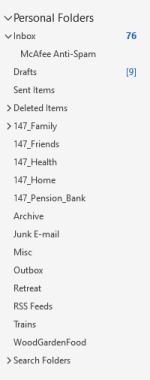
This is what my Outlook folders look like

Outlook1.png

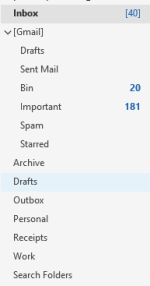
And this is what the G-Mail looks like in Outlook just below the personal folders.

Outlook2.png

I do regularly maintain the G-Mail folders but cant see why I am using maybe 71% of the allotted space :rolleyes:
 
Another here that's had it with Outlook, Windows and Microsoft in general. Ditto with ever more heavily Googleised Android on mobile phones. This having previously given up on Apple as a consequence of a computer having been rendered obsolete by an OS update after three years.

Thinking of Linux Mint but a little cautious that the devil/complexity is in the detail.

Also that I may need to buy a new laptop (this one is 9 years old and starting occasionally to make weird whirring noises despite having a sild state hard drive) and that only a few brands seem to continue support with Linux installed, and in those cases Ubuntu rather than Mint. (?)

Just waiting for a gap in commitments to bottom it out and to act.

Fed up with the collapse in ethics - intrusion into activities on websites to 'offer' xyz, Edge over riding default browser settings and being incapable of removal without problems, card details provided solely to cover a subscription being shoved in my face when I go to pay on websites in an attempt to get me to use the MS payments system, forced use of complex authentication I don't need in Outlook, and with CoPilot popping up in all sorts of apps, almost daily 'required' updates which bring ever more sh1t etc etc

Also with ever more aggressive forced T&Cs and websites in general, search engines that bring up only a page or two of top bidding businesses only vaguely related to the search terms..

Heaven knows what's on Windows 11 and baked into new computers by now.

The cloud turns out to have been a massive scam which has ended personal control of what are supposedly personal computers..
 
Last edited:
The noise can only be the cooling fan. In my limited experience they're a pain to clean, however you might improve it with a small paintbrush and vacuum, assuming you can get into the machine in the first place. Obviously, be cautious about removing any heatsink - they rely on good thermal connection to the chips they protect, and an air gap is a bad thing, as is excess thermal paste.

There are several Linuxes that are good on older machines. My own laptop runs Mint most of the time and it's a cheap HP one ("for students"), which I bought around 11 or 12 years ago. The only upgrade was removing the not-even-turned-on hard disk (Win 10?) and replacing it with an SSD. I can't remember how much RAM it has but it's probably considered pitiful. I use it mostly for financial stuff, so the demands placed on it are small.

Most distributions will use GRUB as the bootloader, which has multi-boot baked into it. This means you can try several flavours of linux simultaneously on the same machine (reboot to switch), and/or Windows. If you do already have Windows on it, linux should read any NTFS or FAT32 partition, meaning you can access any Windows data. Linuxes tend to use EXT3 or EXT4 partitions, which AFAIK can't be read by Windows, but are transparent to other linuxes.

The only drawback with this (for me - YMMV) is that each OS needs its own bootable partition on the disk, which you choose at boot via GRUB. Inactive boot partitions are recognised and mounted automatically, so you see them as a second disk (with all the data accessible). As stated though, Windows usually cannot see linux partitions (if this has changed, my apologies - I haven't run anything Windows at home since around 2004).

One of the fun things about Linux disk partitions is that they can be resized dynamically, i.e. after they've been created. This is not a game I regularly play, in case I wipe something, but it means you can free-up space without completely reformatting the whole disk.

My laptop is presently dual-boot between Mint and xubuntu (looks like old-style Windows but basically Ubuntu beneath the surface). I intend to remove xubuntu as I don't use it now and its wasting disk space (it's a small SSD, by current standards).

I find that both Windows and Android become more like toys with each successive release. It's not so bad with linux. It's also really stable with respect to things like audio drivers - I've used it for so long now I had forgotten how flaky Windows peripheral support can be, but was frustratingly reminded of that in a recent project. I also like values expressed in dB, not some arbitrary slider position. Again, this is baked into Linux.
 
Ta for the input Eric. The fan is probably the only moving item in my laptop so I'll have to strip it again and see what's going on. The laptop was a top spec Asus in 2016. It's had a new keyboard which is acting up again (keys stop working) - am using an external. I have a sneaky feeling that the problem may be caused by a dodgy ribbon connector which I'll have to fix if it's to be kept.

Quite apart from the dodgy ethics I really struggle with the layers of useless 'functionality' that keep on being added to mainstream stuff. It's got so that the basic functions are often buried and very difficult to find. Collusion between marketing and software people trying to hold on to their jobs...

My instinct is to just install Linux and be done with it - it can't be worse. This on the basis that it'll force finding out how to do stuff.

My requirements are basic too - interference free web access, good security, compatibility with our Teltonika 4G router run hard wired network, good search engine (does such a thing exit any more?), word processor, occasional spreadsheet, even more occasional presentations, easy basic handling and editing of pictures, graphics etc, email, easy loading of photos etc from a phone when needed with good security and minimal complexity. Phone access to email would be nice, but not at the cost of signing up to Google and/or MS T&Cs. A reasonably nice looking interface would help too..

I looked at e/foundation Google free phones last year (Linux compatible?) but couldn't decide how credible/reliable they might be.

Concerns re. Linux are the possibility that some basic functions might not be easily added and that the learning curve could be beyond an intelligent user...(I'm generally OK if there's a support forum or page somewhere)

Am I asking for too much?
 
You're not asking too much.

I edit photos and video and audio, I do all kinds of general office stuff (spreadsheets word processing, etc.), I browse the internet and do Zoom and Teams calls occasionally. All my linux boxes (currently three) talk to printers and scanners and each other. Printers vary between almost new to a big laser that's around 30 years old (networked). The linux boxes can also act as print servers for the Domestic Controller's iPad and my Android tablet - we don't print from 'phones but I guess we probably could. I use a Wacom graphics tablet instead of a mouse, because I much prefer it. And I also use Sketchup 2015 or 2017 (the Windows version), which runs in the "WINE" Windows emulator (it was intended for running Windows games, which it does pretty well). We usually use email to send 'phone pictures around - if they need to be printed I process them in GIMP.

Everything mentioned above uses completely free operating system and software, and even the graphics tablet and scanner need no special drivers. Wine is a simple download but the office suite, 'LibreOffice' is installed with Linux itself. Upgrades tend to be fairly frequent, but don't stop you working, and almost never need a reboot.

About the only software I pay for is TaxCalc. I've been using it for around 30 years and it's brilliant. They release and fully support a Linux version, because a lot of accountants run Linux.

Linux used to be arcane, because it was originally intended to be Unix (running on a PC). It didn't even have a desktop. All that changed around 25 years ago and it's only improved since then.

HTH. S.
 
That's very encouraging Eric. Thank you. It's great to get feedback from a down to earth practicality oriented user.

I have a heavy duty bench build about 3/4 complete at present, but once that's done there should be room to get stuck in on Linux.
 
I have Thunderbird but annoyingly arrivals to my inbox are always out of date order. I don't know how to fix it. Is there anyway to fix this?
 
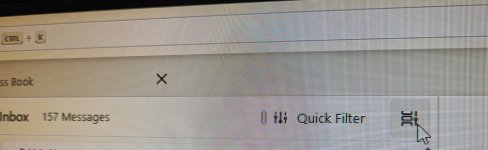
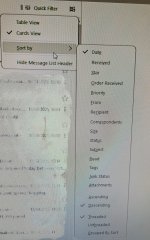
Are your settings similar to mine?

to get the menu-
20250420_093344.jpg

and the menu...
20250420_093402.jpg
 
On all least the version of thunderbird I have, click on the date, sender, subject etc column headers to sort messages on that field. Click again to reverse order.
 
Ok, pressure off at the moment.

Received an e-mail from MS saying that the automatic renewal is scheduled for 1 June! :mad:
No way, I changed the option to manual payment.
So, logon to to MS account.
Option selected is manual payment.

BUT!

There is an offer for 2 FREE MONTHS! Renewal then 1 August.
Maybe they suspect I will be ditching MS365.
 
Back
Top