• Hi all and welcome to TheWoodHaven2 brought into the 21st Century, kicking and screaming! We all have Alasdair to thank for the vast bulk of the heavy lifting to get us here, no more so than me because he's taken away a huge burden of responsibility from my shoulders and brought us to this new shiny home, with all your previous content (hopefully) still intact! Please peruse and feed back. There is still plenty to do, like changing the colour scheme, adding the banner graphic, tweaking the odd setting here and there so I have added a new thread in the 'Technical Issues, Bugs and Feature Requests' forum for you to add any issues you find, any missing settings or just anything you'd like to see added/removed from the feature set that Xenforo offers. We will get to everything over the coming weeks so please be patient, but add anything at all to the thread I mention above and we promise to get to them over the next few days/weeks/months. In the meantime, please enjoy!

Video buffering.

It would be interesting to see what the browser's development console has to say (not that it'll necessary help).

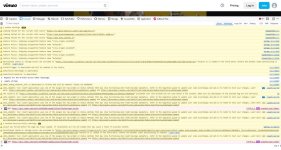
From the Firefox window with that Vimeo link loaded, press Ctrl-Shift-I or go to the menu and click "More tools" and then "Web Developer Tools". Go to the "Console" tab, then reload the browser tab and try playing the video. It'll probably look something like this:
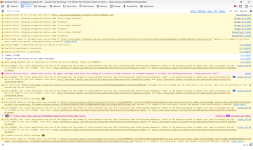
1728569771016.png

As you can see, there are a lot of warnings (mostly probably related to Firefox blocking trackers). If yours shows a lot of other red lines then it might give a clue.

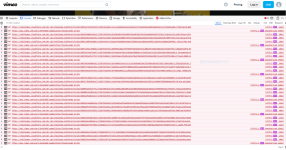
The network tab can also be quite interesting as it shows which things have failed to download:
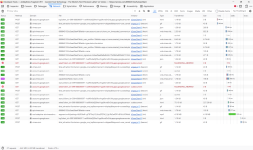
1728569843685.png
 
It would be interesting to see what the browser's development console has to say (not that it'll necessary help)

I did that, but I can't take a screenshot. There's quite a lot of red and purple, and "unauthorised"...... I clicked on "Errors" and 15 were listed.
 
Reluctant to get involved as my experience with windows is all 2nd hand.

Did Mike say there was another device in the house that was streaming Youtube without issues?
If so I think I would be sitting down with both machines side by side going through the broswer/OS security settings on both. Something must be different.
If this has been mentioned/tried already I shall crawl back into my hole and sorry for wasting your time.

Hope you get sorted soon
 
Try typing snip into the search bar and using that instead, you might have better luck.

You can draw a box around the bits you want to capture and paste into here, or save first if need be.
 
If I replace the drive in a laptop or PC for something larger I always use my regular backup to restore onto the new drive. Worked every time... so far.
Same here, I stuck in a larger SSD earlier this year and it isn't so bad to do.
 
There's one plus from this saga Mike in that you'll know a fair bit more on the workings of your machine.
 
Okay so cloudflare is blocking something from your machine, and a brief Google suggests to me that it's quite probably an ad-blocker on your machine (as other people have had the same).

As suggested, whatever ad-blockers, malware, AV etc you have installed you need to disable one, test, re-enable, disable different one, test, etc... until you find the ones causing the issue.

I'm going to guess that the ad-blockers and AV you have on your machine are not the same on Mrs G's...?
 
My wife doesn't have an Adblocker, but we have the same anti-virus. I believe we also have the same malware protection.
 
There's one plus from this saga Mike in that you'll know a fair bit more on the workings of your machine.
I'm afraid, Bob, that's like telling someone who returns from Ibiza after 10 days of partying that at least they now understand a fair bit of Spanish.
 
One of the advantages of Brave as a browser, is that you don't need separate ad blockers. It has a shields button and that enable you not only to turn on or off, but also to customise for any web site what you wish to control - scripts, cookies, fingerprinting, tracking etc.
 
Not that I've cured it yet, but I just wanted to say a huge thanks to everyone who has taken time to respond in this thread. I am deeply grateful, but not in the least surprised. Most of what we have gone through over the last 3 or 4 days was way beyond my knowledge and capability, so I really would never have got this far without you.

I'm going to open in normal mode (as opposed to safe mode), and remove Adblock Plus. If everything returns to normal I'll either swap to an ad-blocking browser (Opera One does that apparently, as does Brave), or I'll try another adblocker in my normal browser.
 
Well, wouldn't you just know it. I re-started Firefox in Troubleshoot mode, as per Dave's suggestion above, and with Adblock Plus removed from my computer. Youtube isn't working.

So, Opening the OS in Safe Mode leaves Youtube working, but opening Firefox in Troubleshoot mode (= Safe Mode), leaves Youtube not working.
 
The big advantage of an all in one browser Mike, is that there is only one layer of updates and doesn't require two sets of software to inter-relate. You Tube constantly tries to defeat the ad blockers and they constantly update to defeat You Tube in return. Brave updates every few days (small green button in the browser). I used to find this irritating, but in practice it only takes a few seconds and you don't need to restart anything. Tabs re-open as they were before once it has refreshed. It also has a VPM mode built in and you have a choice of search engines that it takes a couple of seconds to switch in and out of. I ditched ad blockers for this reason quite a while ago - I think based on a recommendation from Dr Al actually when I got fed up with Safari. Brave runs on Chrome (as do many) as the background code (but without dishing up your data to Google) so works well with You Tube etc.
 
Just a thought Mike. There might be an easier way to check if a program is the issue. What I've done in the past is just disable it temporarily and it's simple to do and just as simple to reverse.

With your system running normally open task manager and under the processes tab scroll down to the prog (Adblock), right click and select DISABLE then close task manager and try Youtube. To reverse just go back in and select ENABLE and it's back to where it was.
I have a number of progs and apps disabled in this way so they're not running in the background and they just fire up if I open them via a shortcut when I need them.
 
Mike, now that the team have shown that your issue is probably caused by Adblock Plus on Firefox, can I put in a suggestion.
I think my setup is probably quite similar to yours - a not very new PC running Windows 10 (not capable of running Win 11), Firefox and Duck Duck Go or Ecosia for search.

I used to use the Adblock Plus extension on Firefox but some time ago switched instead to UBlock Origin. I can't remember why, but it's quite likely to have been because of YouTube.

Running UBlock Origin gives me uninterrupted playback of videos on YT and any other sites I've needed to use, so it might be worth your while deactivating ABP and making the switch. 🤞

PS - the tidiest way to disable ABP and enable UBO is via the add-ins menu in Firefox, accessible with Ctrl+Shift+A.
 
Well, it appears more complicated than at first meets the eye. I have removed Adblock Plus from my computer, entirely...........and it has made no difference to how Youtube or Facebook (mal)function.
 
Here is Youtube on Chrome, with no adblocker at all on the computer, with nothing else open and shortly after a re-start:

Capture 3.JPG
 
And here is Facebook. I haven't blanked anything out.....this is what I see. I can't retrieve that message, which will be about some wood I am trying to buy:

Capture 4.JPG
 
Try installing the new browser Mike and don't let it link to any of the others if it asks. That way you can prove whether the browsers already installed are having a problem. Two things can cause what you're seeing, slow internet (which we've almost certainly discounted) and machine resources being eaten by something else.
 
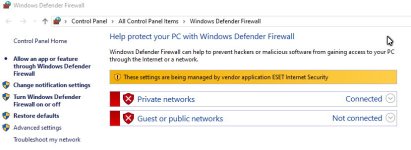
What do you get if you check out Windows Defender settings?

Is it running or is another application taking over its duties?


Typical display:-

Defender.jpg
 
That's another difference between your set-up and ours, Mike. We just rely on Windows Defender, with no third party anti-malware package.
 
So, Opening the OS in Safe Mode leaves Youtube working, but opening Firefox in Troubleshoot mode (= Safe Mode), leaves Youtube not working.
FF Troubleshooting mode is not the same as safe mode, it only deals with FF extensions and plug ins, your issue could well be with something else installed on your machine.

Disable MalwareBytes and test, find in Task Manager what else is running that isn't native to Windows and disable. It's a treasure hunt...
 
Nice fresh start without the clutter and crap will sort it, rather than chasing the problem caused by something unknown clashing with something else.

At work I would just hand you a freshly installed laptop job done.

Pete
 
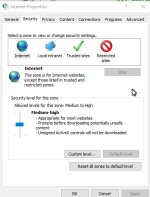
Also are there any clues in "Internet Options" under the various tabs.

Internet.jpg
 
Nice fresh start without the clutter and crap will sort it, rather than chasing the problem caused by something unknown clashing with something else.

At work I would just hand you a freshly installed laptop job done.

Pete
Agreed, but a home machine has all Mike's history, apps etc and he doesn't want to have to do all that, not without troubleshooting it first.
 
If it works in Safe Mode but nothing else seems to help outside of that, I'd be suspecting the antivirus package first - especially since modern Windows Defender can do that job just as well for home usage.

Anti-virus packages are also constantly updating themselves without telling you about it, which would fit with a problem that suddenly appears despite you not having changed anything.
 
FF Troubleshooting mode is not the same as safe mode, it only deals with FF extensions and plug ins, your issue could well be with something else installed on your machine.

Disable MalwareBytes and test, find in Task Manager what else is running that isn't native to Windows and disable. It's a treasure hunt...

My understanding of Malwarebytes, at least as I have it installed, is that it does nothing until I run a scan. I am not aware of it being active at any other stage. I'll turn it off (or even delete it) this evening and run Task Manager, as you suggest.
 
Nice fresh start without the clutter and crap will sort it, rather than chasing the problem caused by something unknown clashing with something else.

At work I would just hand you a freshly installed laptop job done.

Pete
If I could hand this over to someone, Pete, who would just hand me back a new machine loaded up with all my folders, bookmarks, auto-fill options, programmes (particularly work-related), and so on, I'd have done it days ago. The fact is, when you know as little as I know, changing machines, or even restoring the OS etc, is incredibly daunting. This machine is my livelihood.
 
Nice fresh start without the clutter and crap will sort it, rather than chasing the problem caused by something unknown clashing with something else.

At work I would just hand you a freshly installed laptop job done.

Pete
Sounds great - but do you have an automated way of turning off Microsoft's demands to keep your PC from "phoning home" every few minutes and not installing all the extra "features" that I will never need or want? The list of clutter and crap that needs to be actively rejected seems to get longer with every Windows update. It's what puts me off doing any reinstallations of Windows.
 
Sounds great - but do you have an automated way of turning off Microsoft's demands to keep your PC from "phoning home" every few minutes and not installing all the extra "features" that I will never need or want? The list of clutter and crap that needs to be actively rejected seems to get longer with every Windows update. It's what puts me off doing any reinstallations of Windows.
Yep, that's another big difference between corporate and home setups. Any moderately-sized company IT department worth its pay will have a set of pre-configured standard images that can be automatically deployed to a machine, new or old, and start up with everything they need installed and ready to use. The vast majority of individuals don't have that, and it changes the effort required for a clean install by an order of magnitude.
 
Is it exactly the same in a firefox private window? (right click your bookmark and select open in new private window)

Also it looks like a very zoomed in youtube page (the basic looking link shows it isn't) - what happens if you zoom out? (Hold ctrl then mousewheel or + and - keys)

Did we ever try a new user to see if it is the same? (settings-accounts- email and accounts - add an account). You can delete the new user account there too.
 
Back
Top